

Are Customers Leaving Because They Can’t Find What You Sell?
Imagine a potential customer arriving on your website with a clear requirement. They need a replacement component, a service in their area or a supplier with a particular capability. You can help them. Your website contains the information. But they cannot find it.
They try a category, open a few pages and type a phrase into the search box. The results show an old blog post, an unrelated product and little else. They may call you. They may also return to Google and try another supplier.
For business owners, that is a useful question to investigate before spending more money attracting visitors. Can the people already reaching your website find what they need and take the next step?
Better website search can help, especially where there is a large catalogue or substantial resource library. The sensible investment starts with identifying the obstacle, then choosing the smallest improvement that solves it.
Why website search deserves attention now
On 29 September 2026, Webflow announced the Algolia Search and Sync app. It connects Webflow CMS collections with Algolia and supports search experiences with filters and sorting. Published CMS changes can sync automatically after the relevant fields are mapped.
That creates another option for businesses wanting a more useful searchable catalogue or content library. The app is free to install, but owners should still confirm the full cost of the search service, implementation and ongoing support.
The business opportunity is broader than one platform update. When your catalogue grows, a search experience that once worked may become frustrating. New technology is a reason to review the problem, not proof that your website needs an upgrade.
Website search serves people who have already arrived
Google search helps people discover your business. Your website’s own search helps them explore what you offer once they arrive. Improving one does not automatically improve the other.
A visitor who knows your exact product code needs a direct match. Someone researching a problem may need a useful service page. Another person may prefer browsing categories because they do not yet know the right terminology.
These journeys should work together. Clear menus, descriptive page titles and useful category pages remain essential even when a search box is available. Our article on the elements of a high-converting website explores the wider task of guiding visitors towards a relevant next step.
Before commissioning new functionality, ask someone unfamiliar with your business to find three important things on your website. Watch where they hesitate. Avoid explaining where to click: those moments of confusion are the evidence you need.
Which businesses are most likely to benefit
Consider an industrial distributor selling fittings in different materials, dimensions and connection types. A buyer might search using a part number, an industry nickname or a description. Useful filters could narrow the selection without requiring the buyer to open every product page.
A manufacturer may organise products by internal ranges, while customers think in terms of application. A search and browsing structure based on what customers are trying to achieve can bridge that gap. The product page still needs accurate specifications so the buyer can assess suitability.
For a professional services firm, the challenge may be finding the right expertise among many services, industries and articles. Separating service results from general educational content can help visitors distinguish what they can buy from what they can read.
A training provider might need searchable courses by subject, delivery format and location. These are illustrative situations, not promises of increased sales. The common thread is enough information or choice that visitors need help narrowing it down.
A small business with five clear service pages may gain more from simpler navigation and stronger page content than a separate search platform.
Choose the right level of improvement
Start with the customer’s task. If people cannot identify the correct category, improve the labels and page structure. If they know what they want but struggle to locate it across many pages, basic site search may help.
If they must compare many items against meaningful criteria, a filtered catalogue is worth considering. Filters should reflect real buying decisions: material, application, location or delivery format, for example. Adding every available attribute can create another complicated interface.
More advanced search can be considered when ordinary keyword matching repeatedly fails to understand customer language. It still needs testing against actual enquiries. A system that produces plausible but unsuitable results is not a useful improvement.
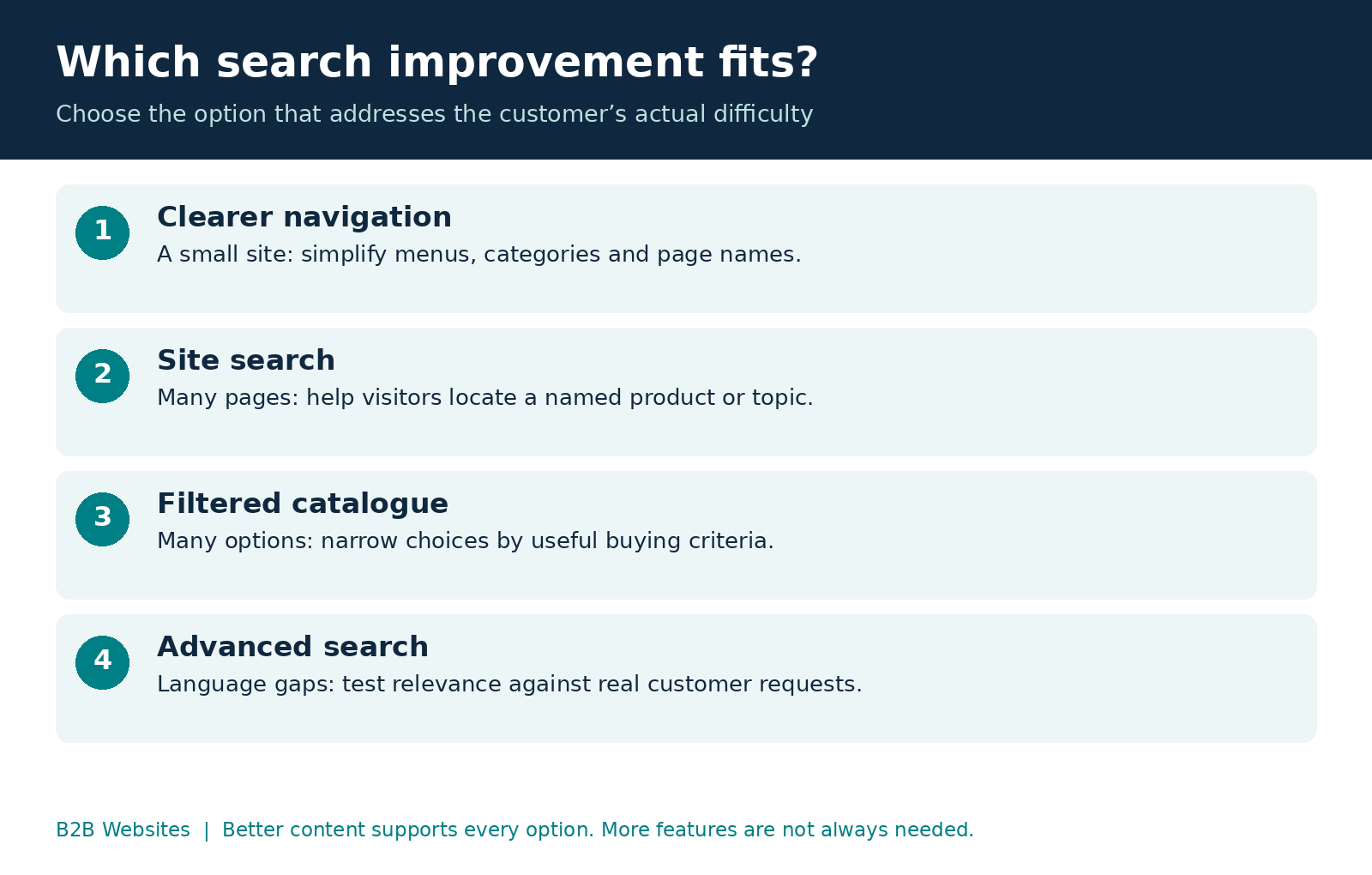
Treat these as options rather than a ladder everyone must climb.
Your product and service information comes first
Search works with the information it receives. Inconsistent names, missing dimensions and outdated service descriptions limit what any search experience can achieve.
Start with commercially important pages. Give each product or service a clear name, a useful description and consistent categories. Put important attributes into dedicated fields where they need to support filtering. Check whether your team and customers use different words for the same thing.
For example, a buyer may ask for a “replacement seal” while your catalogue uses a more specific technical name. Your search implementation may need an agreed synonym or a clearer description. Exact product codes also need careful treatment so that a close match is not mistaken for the requested item.
Clear, organised content has benefits beyond on-site search. We discuss the importance of understandable website information in Is Your Business Website AI-Readable?. However, making a catalogue searchable does not by itself guarantee visibility in Google or AI answers.
Assign someone responsibility for reviewing the content. A well-built search feature can gradually become less useful if new pages are entered inconsistently.
Make results useful on a phone
A results list should help people judge relevance before opening a page. Depending on your business, that could mean a product image and code, a service location or a short description explaining the intended application.
Keep the search field easy to find. Give filters clear labels, show which ones are active and provide a simple way to remove them. Test with a real phone and keyboard, including whether people can operate the controls without relying on a mouse.
Consider the experience when nothing matches. An empty screen leaves the customer with another problem. Offer a way to revise the search, clear restrictive filters or contact your team with the original request preserved. Suggested alternatives should be clearly identified as alternatives.
Sometimes the best next step is expert advice. For technical products, an enquiry button can be more useful than encouraging a buyer to make an uncertain selection.
Connect discovery to a useful enquiry
Finding a suitable item is only part of the journey. The next step should preserve the context your customer has already supplied.
When someone requests a quote from a product page, include the product reference in the enquiry. Where appropriate, carry selected options into the form and ask only for the additional details your team needs. Make those details visible for the customer to check before submitting.
A connected CRM can then help the team receive, assign and follow up the enquiry. This is the broader principle behind turning modern websites into integrated business systems.
For inventory businesses, the website may also need information from a separate operational system. Our overview of Webflow, Xano and Wized for inventory-based businesses explains how connected tools can support those requirements.
Agree where stock, pricing and specifications are maintained and how quickly changes should appear. A search index is a copy used for retrieval; it should not be assumed to be the authoritative source for live availability. Customer-specific pricing and private records also need appropriate access controls before they are exposed through search.
Measure whether the investment helps
More searches do not automatically mean a better website. People might be searching because navigation has become harder. Equally, fewer searches could mean improved categories are doing their job.
Useful measures include the terms people search for, searches with no results, which results they select, and whether they subsequently enquire or purchase. Set up the necessary tracking rather than assuming every event is recorded automatically. Avoid collecting personal or sensitive details that visitors may type into a search field.
Look at enquiry quality too. Is the product reference complete? Does the customer understand the service? Are staff spending less time asking which item the customer meant? Our article The Biggest Waste of Payroll Isn’t Staff examines the wider cost of disconnected processes and repeated administration.
Compare performance over a meaningful period and allow for traffic changes, campaigns and seasonal demand. People who use search may already have stronger buying intent, so a higher conversion rate among those visitors alone does not prove the search feature caused it.
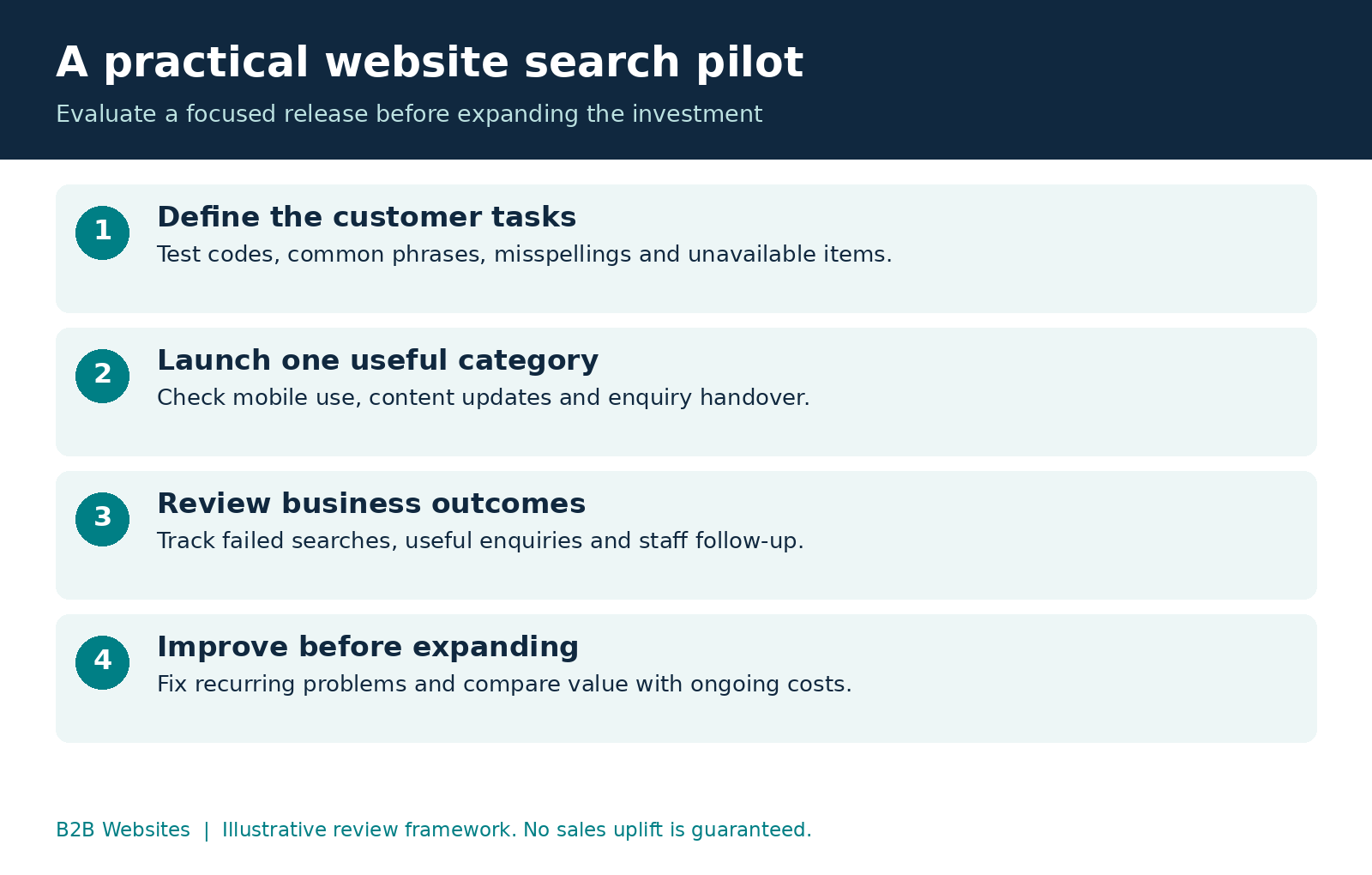
Start with a focused pilot
Choose one commercially important category or service area. Gather real questions from your sales team and create a short test set: an exact product code, a common customer phrase, a misspelling, a broad category and something you do not offer.
Record what should happen for each test. Include mobile use, empty results and the enquiry handover. Also check how quickly a corrected or withdrawn item disappears from results.
Ask for a quote covering content preparation, configuration, design, integration, testing and ongoing operation. Clarify who manages relevance, reviews failed searches and fixes synchronisation problems. Ask how costs could change as your catalogue and search usage grow.
After launch, review the evidence with the people handling enquiries. Fix the most common failures before expanding. This gives you a practical basis for deciding whether further investment is worthwhile.
Content preparation deserves its own time allocation. Our guide to asset collection and client proofreading before a website launch explains why accurate inputs and review matter to the finished experience.
Frequently asked questions
Does every business website need a search box
No. A smaller website with clear navigation may already make important information easy to find. Search becomes more relevant when the volume or variety of content makes browsing difficult. Test the customer journey before choosing a solution.
Can search be improved without rebuilding the website
Often, yes. Page labels, categories and content can be improved within an existing site. Additional search functionality depends on the platform, data structure and integration requirements. An initial review should identify what can be reused and what needs changing.
Do we need AI search
Not necessarily. Clear categories, keyword search and well-chosen filters may solve the problem. Consider more advanced capabilities only where testing reveals a specific gap, such as customers consistently using different language from your catalogue. Compare the results against simpler options.
Will better website search increase sales
It may remove an obstacle, but it cannot guarantee sales. Product fit, price, trust, availability and follow-up still matter. Define the expected improvement, establish a baseline and measure completed enquiries or purchases alongside customer and staff feedback.
Help customers find their next step
Your website should make it easier for customers to understand what you offer and approach your team with confidence. If important products or services are difficult to find, that is a practical place to investigate your next digital investment.
B2B Websites can review your navigation, content structure, search experience and enquiry handover, then scope improvements around your business requirements.
Talk to B2B Websites about improving your website search and enquiries. Bring a few examples of what customers struggle to find so we can start with the problem that matters to you.









%2520-%2520Main%2520Image.jpeg)
Versatility Across All Platforms


How can i help you today?


