

Visual Search for Business: Can Customers Find You With a Photo?
How better product and project images can help customers discover your business—and give them a clearer path to an enquiry.
A customer sees a garden screen they love, an unusual light fitting or a component they need to replace. They know what it looks like. They may have no idea what it is called.
That creates an opportunity for businesses with something useful to show. Visual search lets people begin with an image, rather than finding the right words first. Your product photographs and completed-project images could become an entry point to your website.
For business owners, the useful question is whether that entry point leads anywhere worthwhile. Can someone identify what you offer, check whether it suits their needs and contact you without starting their research again?
A sensible investment begins with a small group of commercially important pages, accurate images and a way to track what happens next. You do not need to rebuild your website simply because search has another feature.
Why visual search deserves attention now
On 24 September 2026, Google announced new Search Console reporting for web multimodal search. It covers searches using Lens, Circle to Search on Android, image uploads and Chrome’s image-search feature.
Google says the reporting is rolling out globally, with metrics appearing for sites receiving traffic from these searches. The new multimodal search-type filter gives website owners a more direct way to examine this activity.
That is a reporting development, not a promise of extra visitors. Its value is the opportunity to test a business question: are people discovering our content through images, and are the pages they reach helping them become customers?
Our article on the Great Website Bypass explores the wider shift in how people discover businesses. Visual search gives owners another reason to consider the journey before someone reaches the homepage.
What visual search means in everyday business
Google Lens can use a camera image or existing picture to help people explore what they see, including finding products. Think of someone photographing a chair and looking for similar options, rather than typing a description of its shape, fabric and legs.
Searching with a picture is different from typing words into Google Images. It is also different from adding a photo-upload feature to your own website. The first helps people discover businesses; the second helps an existing visitor explain their enquiry.
Those journeys can work together. A customer might discover a supplier through an image, then upload their own photo to ask about size, compatibility or a custom version. However, neither journey means a photograph can establish every technical detail. A visually similar replacement part still needs its specifications checked.
Which businesses have the strongest opportunity
Start by asking your team how often customers say, “I’m looking for something like this.” If pictures already help you understand a sale, visual discovery is worth investigating. These are illustrative opportunities, not claims of measured results.
Retailers and product suppliers. Furniture, lighting, workwear and landscaping products have visible characteristics customers compare. The destination page should make it easy to confirm dimensions, materials, available options and delivery arrangements.
Manufacturers and specialist distributors. Images may help a buyer narrow down a product family. Model numbers, technical drawings and a clear route to expert advice remain essential where a wrong match could be costly.
Trades and home-improvement businesses. A completed fence, kitchen or outdoor area can help customers explain a desired result. A project page should clarify what your business actually delivered, where you operate and how to discuss a similar job.
Printing and signage businesses. Photographs can show the difference between finishes, formats and installation styles. An enquiry becomes more useful when the page also asks about quantity, dimensions and intended use.
Some businesses will have a weaker fit. An advisory practice may gain more from explaining its expertise and answering client questions than from expanding its image collection. Prioritise according to how your customers choose, not how fashionable a technology sounds.
Give every useful image a useful destination
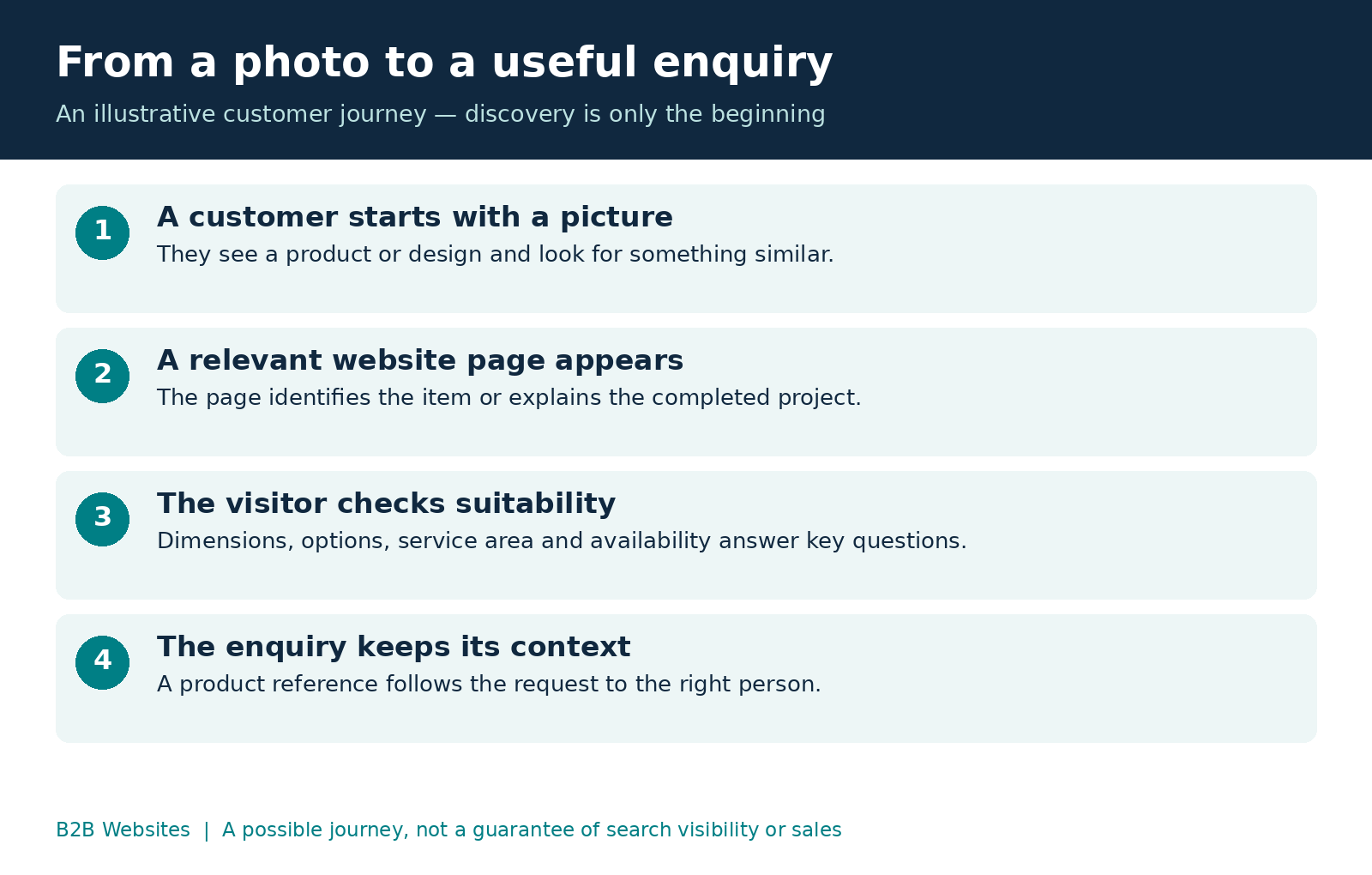
Imagine a supplier with a beautiful gallery of outdoor screens. A visitor sees the design they like but cannot tell which material it uses, whether installation is available or which image their enquiry refers to. Staff must reconstruct the request over several emails.
A more useful page gives that design a name or reference, explains its options and carries the reference into the enquiry form. The image starts the conversation; the page supplies the detail needed to continue it.
For a project, explain the customer’s brief, your scope and the practical choices involved. A photograph of an entire renovation should not imply that your company completed every trade if you supplied only the joinery.
For a product, distinguish the exact item shown from alternatives. If a photograph contains optional accessories, make that clear. Visitors should be able to find the answer before they spend time enquiring about an unsuitable configuration.
This is part of the foundation covered in Is Your Business Website AI-Readable?: information needs to make sense beyond its visual presentation. Clear page content also helps your own team keep the website accurate.
Improve the images you already own
Begin with a content audit. Which photographs show your strongest products or most relevant completed work? Which are outdated? Which need permission before publication? Select images that represent what customers can actually buy or commission.
Use real product and project photography for evidence of your offering. An AI-created illustration can explain a concept—as this article’s header does—but should not be presented as a completed customer project or a faithful photograph of stock you sell.
Google’s image SEO guidance recommends relevant surrounding text, descriptive filenames and useful alt text. It also recommends balancing image quality with loading speed and using crawlable HTML image elements; CSS background images are not indexed as images.
Ask your developer to check those basics. Keep descriptions factual: “Black aluminium slat screen beside a pool” is more useful than a string of sales keywords. Avoid changing existing image URLs casually; include any necessary changes in the implementation plan.
For your content team, create a simple record of each selected image: what it shows, which page it belongs on, who approved it and when it needs review. Our guide to website asset collection and client proofreading explains why this preparation deserves attention before publishing.
Keep product information consistent
Retailers should also review the information behind their product pages. Google explains that Product structured data can make eligible product information available in richer search experiences, including Google Images and Lens. Price, availability and other details may appear, depending on eligibility and the experience.
Structured data is machine-readable information associated with your page. It must accurately represent the product; adding it does not guarantee a particular appearance or ranking. Google also supports product data supplied through Merchant Center.
Before investing in more exposure, check whether the website, catalogue and stock system agree. A visitor attracted by an appealing product still needs reliable information about whether it is available.
Our recommendation is to assign one owner to catalogue accuracy and document how changes reach the website. If staff repeatedly copy details between systems, consider whether an integration would reduce that workload. We explain the broader approach in how integrated software turns websites into business systems.
Make the next step easy on a phone
Review your selected pages on an actual phone. Ask someone outside the project team to find a product specification, check your service area and submit an enquiry. Observe where they hesitate.
Choose the action to suit the page. A standard product might lead to checkout. A made-to-measure item might need a quote request. A specialist component might require a compatibility check before anyone commits.
Keep enough context in the handover that the customer does not have to repeat everything. Include the product or project reference in the submission. Where a photo upload would help, explain what to photograph and keep the form manageable.
Check the complete process, including the confirmation message and the enquiry arriving with the right staff member. A button that works visually is only the beginning. Our article on the elements of a high-converting website explores how page design supports the decision to act.
Measure enquiries as well as discovery
Use the new Search Console reporting where it is available to establish whether visual-search activity reaches your site. Record the relevant pages and compare periods consistently. Check the reporting definitions before combining this activity with other search reports.
Then assess those pages in your website analytics and sales records. Are visitors submitting useful enquiries? Can staff identify the product they mean? Do those enquiries become suitable opportunities?
Treat these as complementary views. Search Console reporting does not automatically connect an individual image search to a customer’s eventual sale. Analytics, consent choices, calls and customers returning through another channel can all limit attribution.
For a practical pilot, track changes to a defined group of pages alongside enquiry quality and staff feedback. Label the launch date and note other campaigns or pricing changes. An improvement afterwards is useful evidence, but it does not prove that image work alone caused it.
Start with a manageable pilot
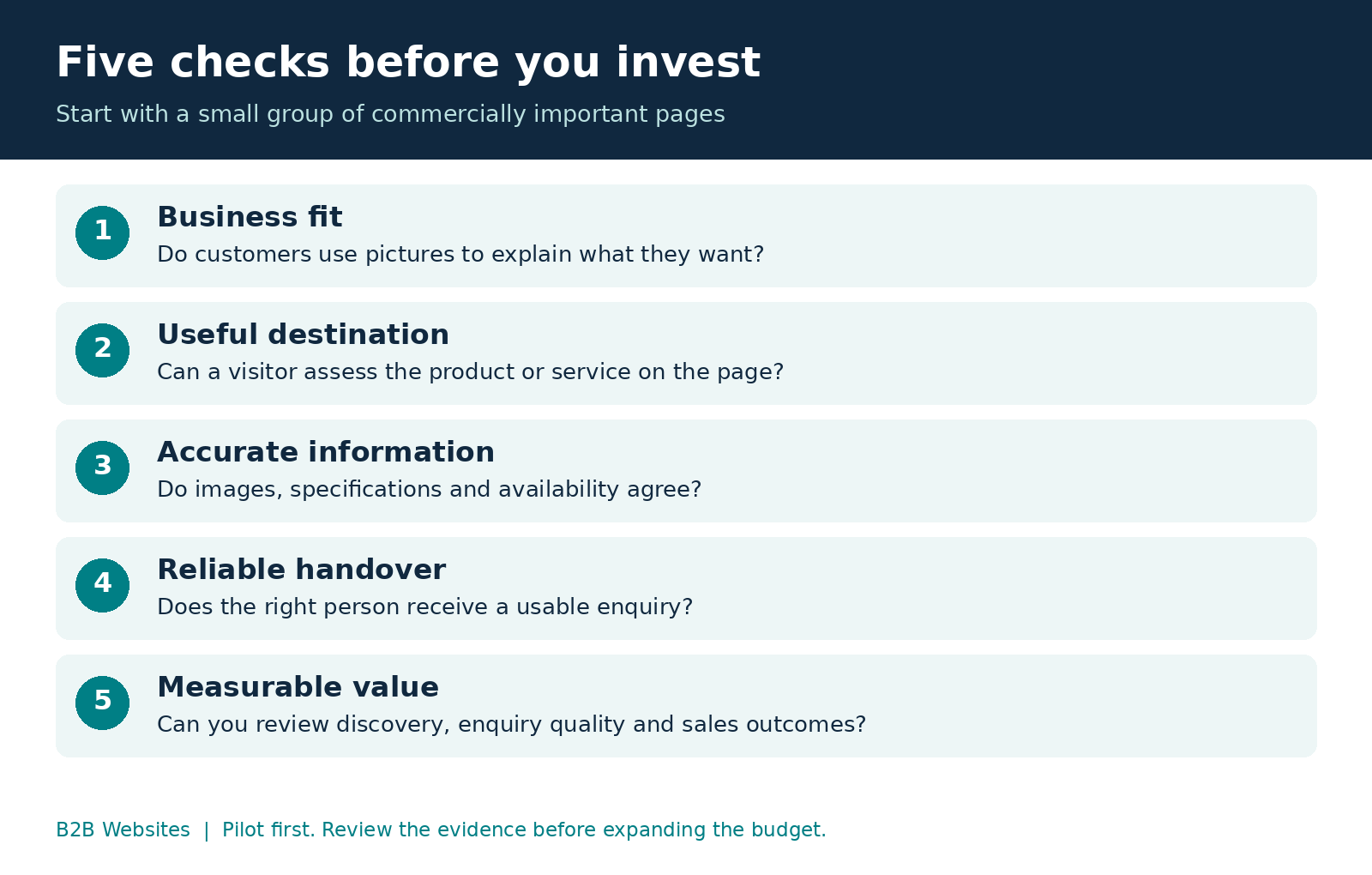
We suggest choosing five to ten pages that already matter commercially. This is a planning recommendation, not a Google requirement. Include the person responsible for sales so the pilot reflects real customer questions.
Agree on what needs fixing, what the work will cost and what a useful result would look like. Budget separately for photography, content, technical changes and measurement where needed. A quote that simply promises “visual search optimisation” is too vague to assess.
Run through the customer journey before launch, then review early findings after a sensible observation period. Low enquiry volumes may require longer before you can judge value. You can still identify practical improvements, such as fewer requests arriving without a product reference.
Where follow-up requires repeated copying and searching, examine that process too. The Biggest Waste of Payroll Isn’t Staff discusses the operational cost of disconnected work. Generating an enquiry and handling it well belong in the same investment decision.
Frequently asked questions
Can any website appear in visual search
A website needs discoverable content, but technical accessibility alone does not guarantee visibility. Start with relevant pages and accurate imagery, then check the available reporting. Suitability will vary by product, service and the customer’s search.
Do I need to rebuild my website
Often the first step is an audit of existing pages, images and enquiry forms. A rebuild should follow an identified limitation, such as a content system that cannot support the required pages, rather than the existence of a new search report.
Can this help a service business without an online shop
Potentially, especially where customers choose partly by appearance, such as landscaping or signage. Show genuine work and explain the service behind it. For less visual services, other content and lead-generation improvements may deserve priority.
How quickly will visual search produce leads
There is no dependable universal timeframe. Results depend on demand, competition, discoverability and the usefulness of the destination page. Agree on a pilot and review evidence before expanding the budget. Avoid promises of guaranteed rankings or immediate enquiries.
Make your website easier to discover and use
Your next customer may start with a photograph and a question. Make sure your website can help them understand what you offer and take a useful next step.
At B2B Websites, we can review the pages, content and enquiry processes that support that journey, then recommend improvements suited to your business.
Book an AI visibility review with B2B Websites and let’s identify where your website can work harder for you.









%2520-%2520Main%2520Image.jpeg)
Versatility Across All Platforms


How can i help you today?


