

AI Agents for Business: Is Your Website Ready to Work Harder?
Where AI can save time, improve enquiries and connect your business systems—and how to decide whether it’s worth the investment.
Your website brings in an enquiry. Then someone has to read it, check the customer’s details, request missing information and pass it to the right person. The customer sees a simple form. Your team sees another job in the queue.
AI agents can help your website start that work: interpreting enquiries, gathering relevant information and preparing the next action.
Whether they are worth investing in depends on how reliably they complete the task and how much effort they save overall.
For business owners, this is where the conversation becomes useful. What could an agent do for your website, your customers and the systems your team uses every day?
In What Makes the AI Revolution Different?, we explored AI’s expanding role in knowledge work. Agents bring that discussion into everyday operations, connecting a customer’s request with the work needed to respond.
What is an AI agent, in plain English?
An AI agent is software that uses an AI model and connected tools to work towards a goal. Within its permissions, it can choose actions, examine the results and decide what to do next.
For example, a chat tool might help you write a response to a customer. An agent connected to your approved business systems could also look up that customer’s enquiry, check relevant records and save a response against the correct contact.
The word “agent” is used loosely. Some products follow mostly fixed workflows; others make more decisions about how to complete a task. Anthropic’s guide to building effective agents makes this distinction between predefined workflows and systems that dynamically choose their steps.
When assessing a product, ask what it actually does, which systems it accesses and where it needs your involvement.
Does your website need an AI agent or ordinary automation?
If a task follows the same rules every time, conventional automation may be the better fit. Copying a completed website form into a CRM rarely needs an AI agent to decide what happens next.
A useful way to assess the options is to look at the decisions involved. Does the task follow fixed rules, need a piece of content prepared, or require several steps that change according to the information received?
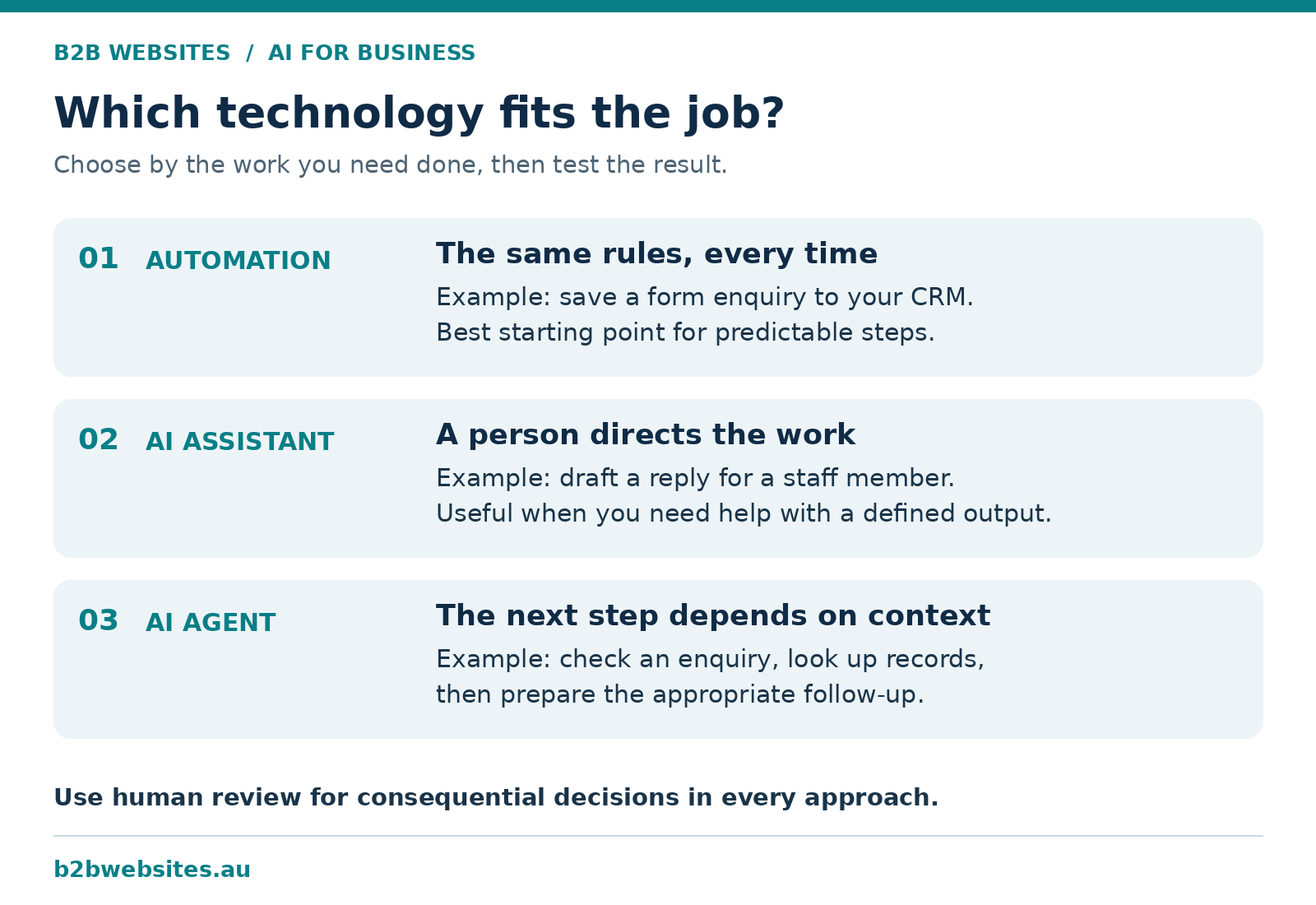
This connects directly with The Biggest Waste of Payroll Isn’t Staff. That article examines the effort lost when people manually move information between disconnected systems.
Fix that connection first. Add an agent where interpreting information or handling variations provides additional value.
What could an AI agent do for your website and business?
The following are illustrative workflows, not claims about results achieved by B2B Websites clients. Each requires suitable connections, permissions and testing.
Turning website enquiries into prepared sales opportunities
Consider a commercial maintenance business receiving enquiries from property managers. Every enquiry arrives differently: some include a site address and photographs, while others simply ask for help.
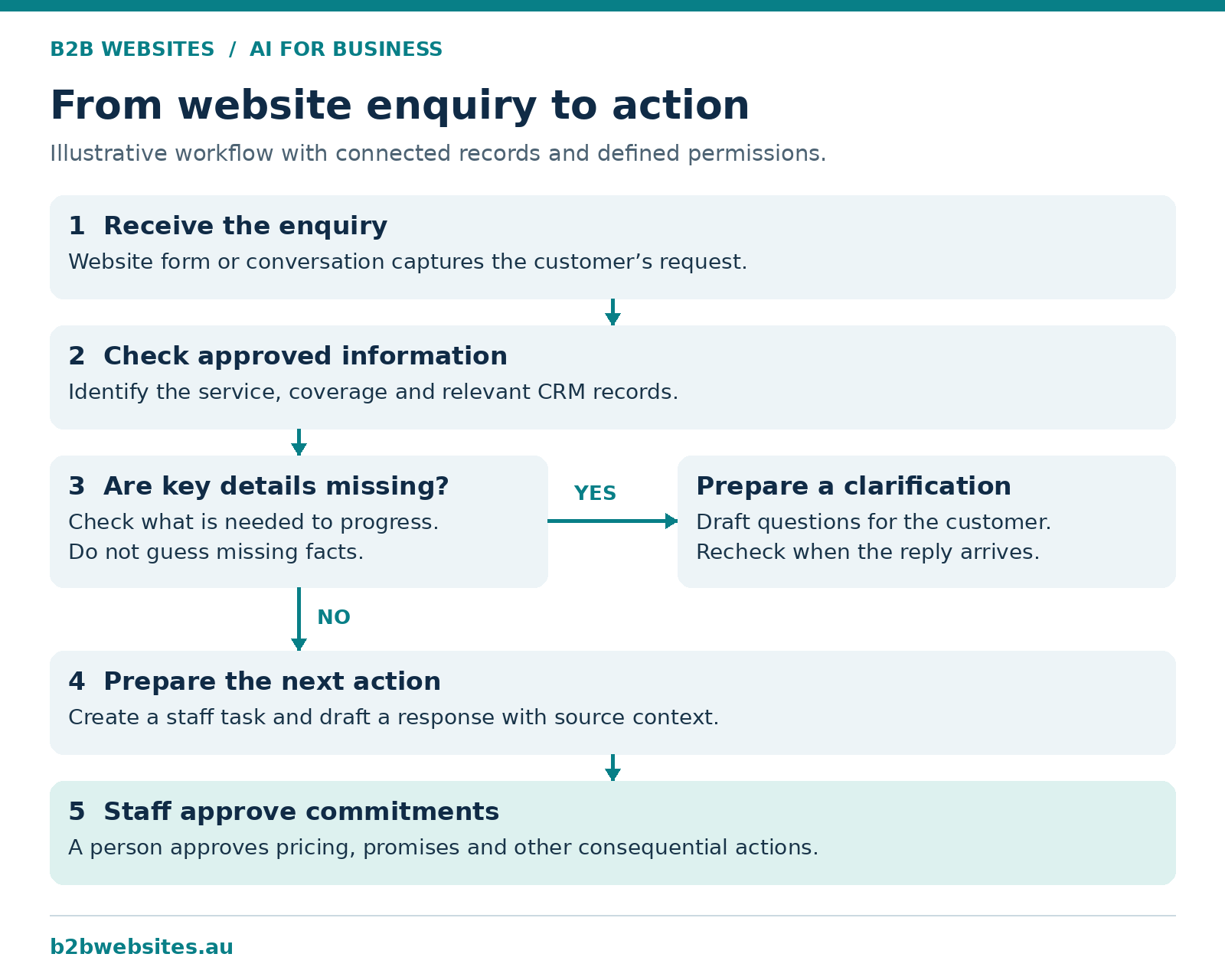
A configured agent could identify the requested service, check whether the location is covered, look for an existing customer record and prepare a request for missing details. It could then create a task for the appropriate person.
Your team receives an organised enquiry with useful context. Pricing and commitments remain subject to your business rules and approval process.
Measure whether the agent reduces handling time and improves the proportion of enquiries ready for a useful sales conversation.
Keeping the next step moving after a consultation
A website booking may lead to a consultation, but somebody still has to turn that discussion into work. This is where the website journey connects with your wider digital systems.
An agent could read an approved transcript, identify proposed actions, match them to a project and prepare tasks with owners and deadlines. Unclear responsibilities would be flagged for review rather than guessed.
The practical benefit is a shorter gap between discussing something and assigning it. Before creating calendar bookings or notifying clients, the agent should follow the permissions you have explicitly set.
Preparing customer support responses
A support agent could combine an incoming question with approved help articles and relevant order or account information. It could prepare an answer, update a support ticket or escalate the issue when the available information is insufficient.
The key is knowing which source is authoritative. An old brochure should not override a current service policy.
Measure correct resolutions, repeat contacts and escalation quality. A fast answer that creates a second problem is poor service.
Finding the exceptions that need attention
A business owner may want to know which enquiries remain unanswered or which projects are waiting on client information.
An agent could inspect authorised records, gather the relevant context and prepare an exception report with links back to the source. Staff can then investigate the items that matter.
Where a simple dashboard or fixed reminder already does the job, use it. An agent becomes more useful when it needs to interpret notes or investigate why something has stalled.
Why do connected systems matter so much?
An agent can only work with information and tools it can access. If customer details are scattered across inboxes, spreadsheets and disconnected platforms, it may have an incomplete picture.
Imagine an agent following up an unpaid invoice when payment has already arrived in a system it cannot read. The message might be perfectly written and completely inappropriate.
Our article on integrated software solutions and websites as business systems explains the foundation: connecting the website, operational data and business workflows.
Before introducing an agent, establish where the correct information lives, how it stays current and what happens when two records disagree. Also check that the platforms allow the connections you need. Access can depend on subscription plans, APIs and account permissions.
What makes an AI agent unreliable?
Poor instructions, incomplete records and excessive freedom can all undermine an agent’s usefulness. A successful test on one straightforward example does not establish dependable performance across your business.
One common mistake is giving a vague instruction such as “manage our sales”. A more useful brief defines the work: review new website enquiries, identify missing information, prepare the next action and leave pricing decisions to the sales manager.
As we discussed in Does Prompt Length Matter?, context and precision are more useful than simply adding words.
Another risk is mistaking confidence for accuracy. The agent should show the records supporting its work and flag missing evidence. Someone also needs to own the process when it fails, loses a connection or encounters an unfamiliar situation.
Finally, agents can encounter malicious instructions inside emails, documents or webpages. This is known as prompt injection. Anthropic’s research on trustworthy agents explains why protection requires multiple safeguards, including careful choices about tools, data and permissions.
We explored the broader concerns around bias, security and responsibility in AI: The Good, The Bad, and The Ugly – Part 2: The Bad. Giving AI the ability to act makes those questions part of process design.
For a first implementation, restrict access to the task at hand, log actions and require approval for consequential changes. A written instruction alone should not be the only thing preventing an unauthorised action.
How do you know whether an agent is worth the cost?
Measure the complete workflow, including the human effort needed to review and correct it.
Start by recording how long the task currently takes, how often it occurs and what an acceptable result looks like. Then compare those figures during a controlled pilot.
For an illustrative calculation, suppose your team handles 100 enquiries per month, spending 12 minutes preparing each one. That is 20 hours of work.
If an agent reduces preparation and review to five minutes per enquiry, the task takes approximately 8.3 hours. The potential saving is about 11.7 hours per month, before allowing for ongoing monitoring and maintenance.
Those are example assumptions, not a promised result. Your pilot needs to establish the actual numbers.
Compare the value of recovered time with software charges, usage fees, implementation costs and support. Track errors and customer outcomes alongside speed. Time saved creates capacity; it does not automatically reduce payroll expenditure.
How should a small business get started?
Choose one recurring task with a clear owner, accessible information and results that are easy to check.
A practical pilot could follow five steps:
Map the current process. Identify where time is spent and which decisions genuinely require judgement.
Define success. Agree on completion quality, acceptable handling time and when a person must take over.
Start with drafts. Let the agent prepare work while your team checks it before any external action.
Test difficult cases. Include missing details, duplicate contacts, contradictory records and unavailable systems.
Expand based on evidence. Allow more responsibility only where the results justify it.
Make the stop button obvious. If the process starts creating confusion, your team should be able to pause it and continue working.
Is your website ready for the investment?
A useful starting point is to examine the journey from visitor to enquiry to completed action. An agent needs a clear role within that journey, plus the information and access to perform it.
Check four foundations before commissioning anything.
Clear service information. Your website should explain what you offer, who you help and which locations you cover. Our guide, Is Your Business Website AI-Readable?, explores why explicit language and structure matter.
Useful customer inputs. Forms and conversations should capture the details needed to progress an enquiry. Avoid collecting unnecessary information simply because AI can process it.
Connections to current records. The agent may need authorised access to your CRM, support platform or booking system. A readable service page does not itself provide the ability or permission to check availability or confirm a booking.
Someone accountable for results. Decide who checks performance, maintains the source information and handles exceptions. Include that work in the budget.
You may be able to improve an existing website progressively. The right scope depends on the platform, available integrations and condition of the current setup. Ask for an assessment of what can be reused before assuming a rebuild is required.
What should you ask an AI or website provider?
A proposal should explain the customer journey and operational outcome in terms you can verify. Ask the provider to show the workflow using examples representative of your business, including a case where information is missing.
Find out which software plans and integrations are required, what implementation and ongoing support include, and how usage charges are calculated. Confirm who maintains the agent when your services, policies or connected platforms change.
Also ask what happens if you stop using the service. Your team should retain access to its business records and have a practical way to continue the process.
A worthwhile proposal gives you a defined task, measurable acceptance criteria and a clear account of the ongoing work involved.
Frequently asked questions
Is an AI agent the same as a chatbot?
There can be overlap. A chatbot is a conversational interface; an agent uses tools to pursue a goal. A chatbot can be the interface through which someone gives an agent instructions.
Can an AI agent work with my existing software?
Potentially. It depends on available integrations, account permissions and the actions the software supports. Confirm these details before choosing a product or commissioning a build.
Will an AI agent replace my admin team?
Treat it first as a way to remove specific tasks. Staff still provide context, handle exceptions and maintain relationships. Any wider staffing decision needs evidence from your own operation.
Can an AI agent run without approval for every step?
Yes, where its configuration and permissions allow it. Decide in advance which actions can run automatically and which need review. Start narrowly and increase autonomy only after testing.
Give your website a useful next job
Your website can do more of the work that follows an enquiry when it is connected to the right information, systems and controls.
Start with one point where customers wait or staff repeatedly step in. Establish whether better integration, ordinary automation or an AI agent would improve it. Then test the result against the time, cost and quality of the current process.
B2B Websites helps businesses connect websites, software and operational systems. If you are considering AI for your website or digital operations, talk to B2B Websites about your website and workflows.
Bring us one task your team keeps doing manually. Let’s work out how your website could help get it done. hello@b2bwebsites.au










%2520-%2520Main%2520Image.jpeg)
Versatility Across All Platforms


How can i help you today?


