

Online Quote Calculators: Could Your Website Win Better Leads?
Help customers understand likely costs, reduce repetitive quoting and turn website enquiries into better sales conversations.
A potential customer visits your website with a straightforward question: “Roughly what will this cost?” Your team needs more information before answering. The customer wants some guidance before committing to a conversation.
An online quote calculator can bridge that gap. It asks a few relevant questions, applies your pricing rules and gives visitors an indicative price or range. When connected to your customer relationship management system (CRM), it can also send your team the details needed to take the enquiry forward.
For trades, professional services and custom suppliers, the opportunity is practical: help suitable customers take the next step while reducing the time spent gathering basic information. The value depends on your pricing, your customers and what happens after they see the result.
What is an online quote calculator?
An online quote calculator is an interactive website tool that estimates a cost from information entered by a visitor. The inputs might include quantities, dimensions, service frequency, product options or location.
A commercial cleaning business could ask about floor area and cleaning frequency. A printing company could ask about quantity, size, stock and finishing. A professional services firm could help visitors explore the likely cost of a clearly defined package.
The important distinction is between an estimate and a confirmed quote. If a site visit, artwork check or scope discussion can change the price, explain that beside the result. Show the assumptions, inclusions and exclusions before asking the customer to proceed.
A useful calculator answers enough of the pricing question to move the conversation forward. It does not need to price every possible job.
Why this is worth considering now
Website tools are becoming more flexible. On 2 September 2026, Webflow introduced visual editing for AI code components, allowing teams to adjust elements and text directly on the canvas.
For business owners, our interpretation is that interactive website features are becoming easier to refine visually. However, a visual editing feature does not validate your pricing model, connect your CRM or guarantee a cheaper build. Those parts still require planning and testing.
The business question remains the same: where could your website help a visitor make a more informed decision? As we explored in Elements of a High Converting Website, a website needs to guide people towards a useful next step. A relevant calculator can become one of those steps.
Which businesses are a good fit?
Start with a service or product that has repeatable pricing drivers. If your team repeatedly asks the same opening questions, those questions may form the basis of a useful estimator.
Trades and property services. Cleaning, fencing and maintenance businesses may be able to estimate standard work using area, length, frequency or service type. Access difficulties and unusual site conditions should trigger a review.
Printing and custom supply. Quantities, materials, sizes and finishing options can support structured calculations. Artwork preparation, freight and supplier price changes still need to be accounted for.
Professional services. A defined service package may suit a calculator where workload can be estimated from a few measurable inputs. Highly individual advice or open-ended projects are usually better suited to a guided enquiry form.
These are illustrative applications, not claims about results achieved by B2B Websites clients. The best starting point is one service your team already understands and can price consistently.
Choose the right level of pricing detail
There are three useful approaches, depending on how much can be known online.
An indicative range suits work with predictable cost drivers but some uncertainty. Explain what could move the final amount above or below the range.
A configured price suits tightly defined products or packages. The tool needs to include all relevant selections and charges, with clear rules for unusual combinations.
A guided enquiry suits work requiring professional judgement, inspection or bespoke scoping. It gathers useful information and recommends the next step without inventing a price.
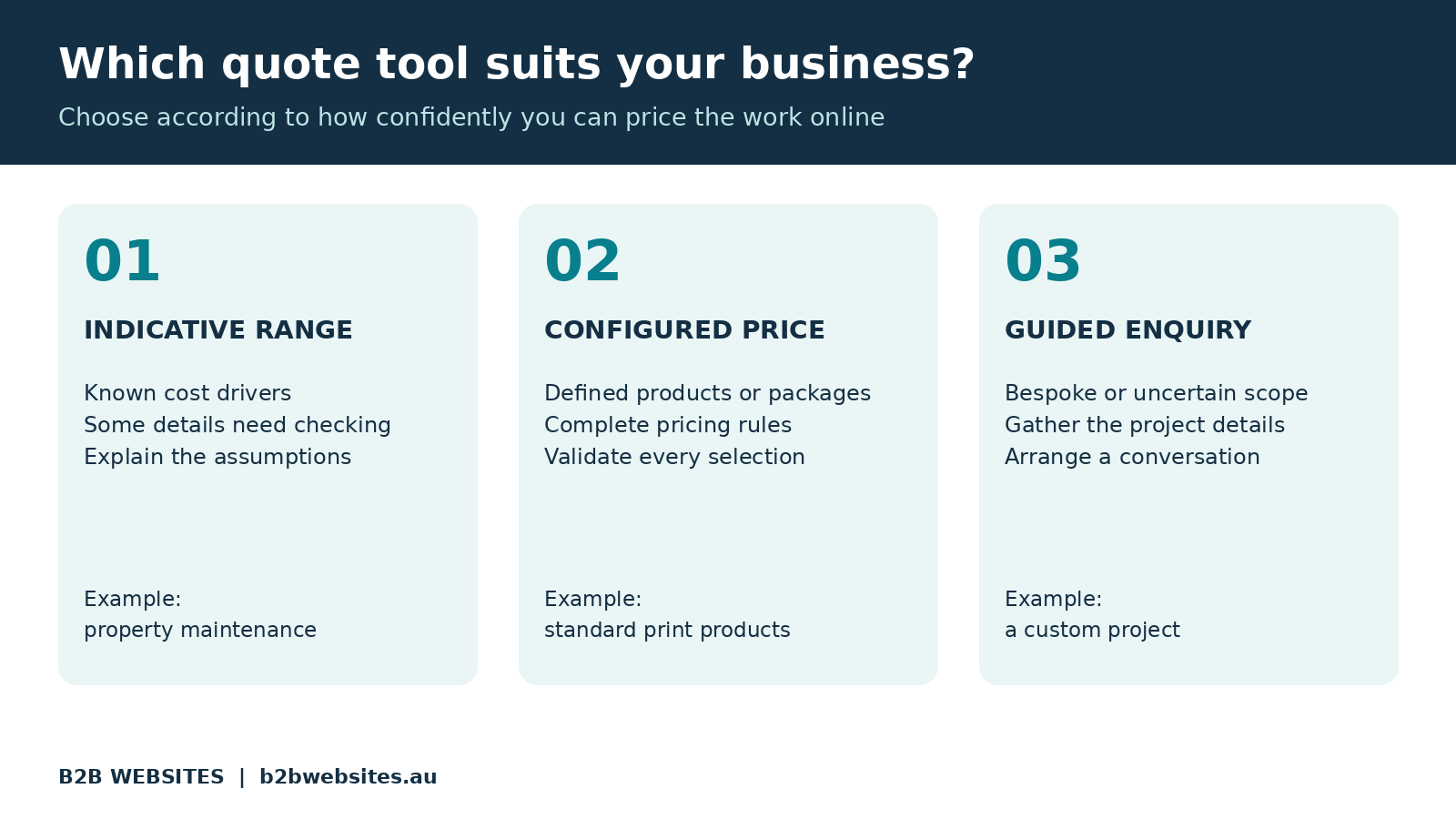
You can combine these approaches. Standard jobs may receive an estimate, while complex requests are directed to your team. Visitors should always have an easy way to say they are unsure.
How a calculator could improve lead quality
A better lead is someone whose needs, budget and timing suit your business, with enough information available for a useful discussion.
Consider an illustrative Brisbane commercial cleaning enquiry. Instead of receiving “Please send a price”, your team receives the approximate floor area, cleaning frequency, suburb and preferred start date. The visitor has also seen an indicative range and understands what it includes.
That gives both parties a more useful starting point. Your salesperson can discuss access, floor surfaces and service expectations instead of beginning with basic data collection.
Some visitors may decide the service is outside their budget. That can reduce unsuitable enquiries, but it is not automatically a success. A poorly explained estimate can also discourage customers who would have been a good fit.
Track whether suitable enquiries and profitable work improve. In Why Is the Tradie Down the Road Getting All the Work?, we discussed how businesses earn attention and trust online. A calculator needs to support that trust through clear, useful information.
Connect the result to your sales process
The calculator should do more than display a number. When a visitor requests follow-up, the information should reach the right person in a usable form.
A connected workflow can save the customer's selections, estimate, assumptions and enquiry source against the contact in your CRM. It can then assign a follow-up task according to service type, location or another agreed rule.
This is the practical role of integrated software solutions that turn websites into business systems: connecting what happens on the website with the work your team needs to complete.
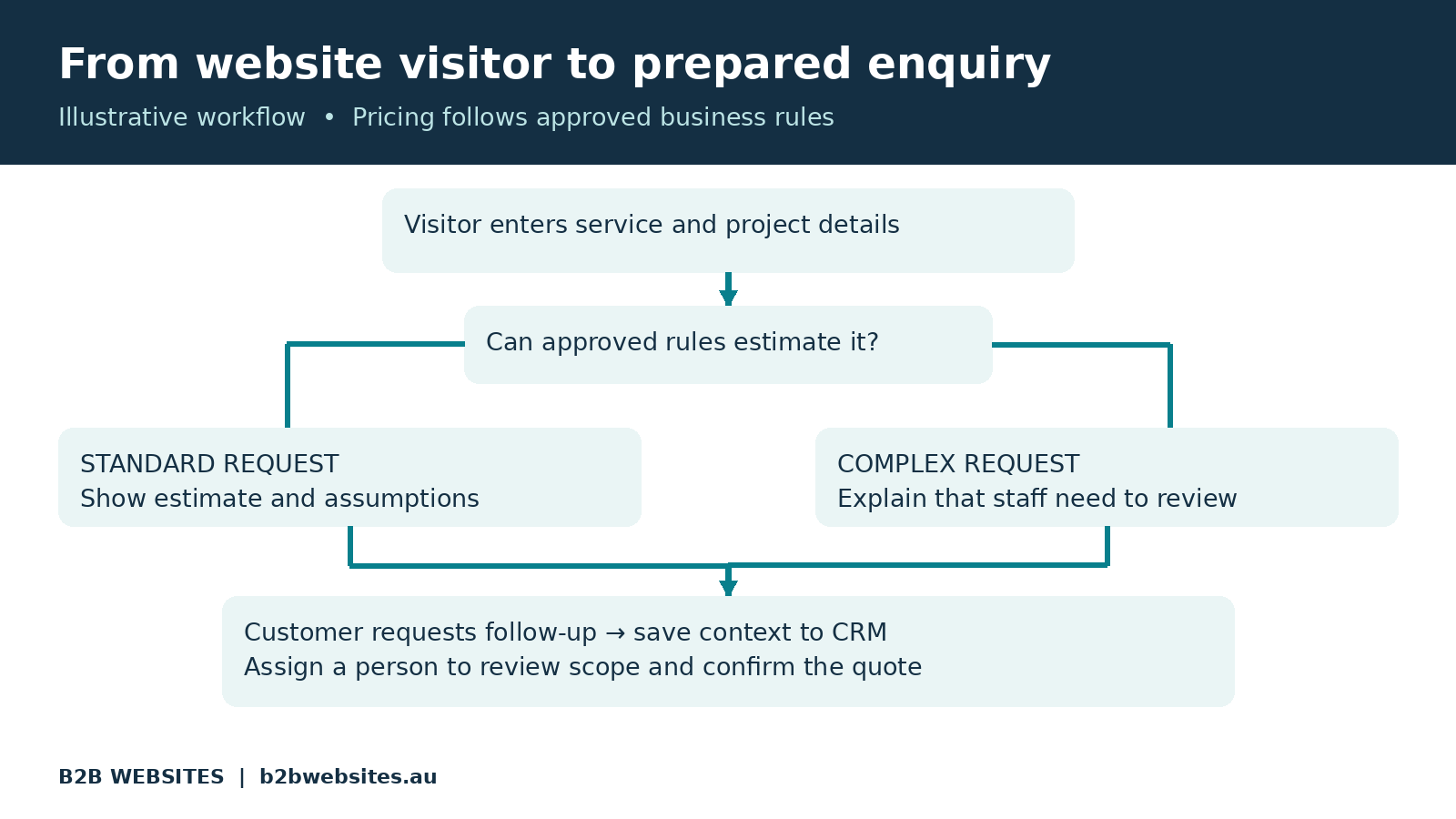
Give standard requests an estimate and direct exceptions to a person, with the enquiry context preserved.
Decide what happens when a connection fails. Store the request safely, make failures visible and give staff a way to recover it. Also avoid creating duplicate contacts every time an existing customer tries a new configuration.
Our article The Biggest Waste of Payroll Isn’t Staff examines the effort lost moving information between disconnected systems. A calculator that creates another copying task leaves some of its potential value unrealised.
Does a quote calculator need AI?
Many calculators work best with ordinary rules and formulas. Quantity multiplied by an approved rate does not require an AI model to make a decision.
AI could help interpret a written description, suggest a relevant service or identify missing information. If you add it, keep the actual pricing calculation tied to approved rates and rules. Unclear requests should be passed to a person.
Last week's article, AI Agents for Business: Is Your Website Ready to Work Harder?, explains how agents can help with the work surrounding an enquiry. A calculator can provide structured inputs for that workflow without becoming an agent itself.
Ask your provider what AI would improve in this particular process. If a short form and reliable formula meet the need, that is a sensible starting point.
Protect accuracy and customer confidence
Assign someone to own the pricing rules. They need to know when rates change, which options affect the result and how updates are approved.
Show customers what the figure covers. State the currency, GST treatment, relevant delivery or travel assumptions and any important exclusions. Avoid displaying a low starting figure that bears little relationship to the options a customer has selected.
Test realistic examples against quotes your team would prepare manually. Include minimum quantities, unusually large jobs, unsupported locations, missing inputs and combinations you cannot supply. When the inputs do not support a useful estimate, explain why and offer help.
For calculators that generate orders or prices your business will honour, validate inputs and recalculate on the server before accepting them. A number displayed in a visitor's browser should not be the sole authority for a transaction.
Keep a record of the pricing version used for each submitted estimate. That makes later conversations easier when rates have changed. Collect only the contact information you need, explain how it will be used and keep enquiry follow-up distinct from optional marketing sign-up.
Make it easy to use on a phone
Ask only questions that affect the result or the next step. Use everyday wording, explain measurements and offer sensible choices for people who do not know an exact answer.
Show progress if there are several steps. Let visitors go back without losing their selections. Include clear field labels, keyboard access and readable error messages, and make sure the result is usable on a small screen.
Consider showing an initial range before asking for contact details. You can then invite the visitor to save the estimate or request a confirmed quote. Test this against your audience rather than assuming a compulsory email field will produce better leads.
Keep the supporting explanation in ordinary page text too. Your services, pricing factors and next steps should be understandable without completing the tool. Our guide Is Your Business Website AI-Readable? explains the value of clear, accessible information. Adding a calculator alone does not guarantee better search rankings or AI recommendations.
How to measure whether it is worth the investment
Agree on what success means before building. Record the current number of suitable enquiries, time spent preparing quotes and proportion of quotes that become work.
Then track the journey from calculator starts to completed estimates, follow-up requests, qualified opportunities and won jobs. A high completion rate matters less if the resulting enquiries are unsuitable.
For a simple illustration, suppose 80 enquiries a month each require ten minutes of initial information gathering. If the calculator reduces that to four minutes, including checking the submitted information, it releases eight staff hours a month.
These are example assumptions, not a forecast. Released time creates capacity; it does not automatically reduce payroll costs. Compare the observed benefit with implementation, subscriptions, integration and ongoing maintenance costs.
Check the gap between estimates and final quotes as well. Repeated differences may reveal missing pricing inputs or unclear assumptions. Compare equivalent periods where possible and allow for changes in advertising, seasonality and enquiry mix before attributing improvement to the calculator.
Start with one service and a clear brief
Bring your provider representative past quotes, your pricing rules and the questions your team asks most often. Identify which requests can be estimated and which need a conversation.
Ask for a proposal covering the customer experience, pricing logic, CRM handover, testing and ongoing ownership. Confirm what your existing website can support before assuming a rebuild is necessary.
Launch a limited pilot, review real enquiries and refine the questions. Expand only when the tool gives customers useful guidance and your team trusts the information arriving from it.
Frequently asked questions
Can an online calculator provide a final quote?
It can where the scope and pricing rules are sufficiently complete and controlled. If inspection, measurements or other checks may change the price, present the result as an estimate and explain how a confirmed quote is obtained.
Can it be added to my existing website?
Often, subject to the platform, available integrations and complexity of the calculation. Ask your developer to assess the existing setup and distinguish a simple embedded estimator from a tool connected to live business data.
Will showing prices put customers off?
It may discourage some visitors, including unsuitable enquiries. It can also help others decide to contact you. Explain the value and assumptions alongside the figure, then measure qualified enquiries and won work rather than form submissions alone.
How much does a custom quote calculator cost?
The scope drives the cost. A simple formula with a few fields differs substantially from a system using live rates, complex options and CRM integration. Request separate implementation and ongoing costs, including responsibility for maintaining pricing.
Put your website to work before the first call
An online quote calculator can help customers understand their options and give your team a stronger starting point. Its usefulness comes from accurate rules, clear explanations and a reliable next step.
B2B Websites helps businesses connect websites, custom software and operational systems. We can assess whether an estimator, guided enquiry form or more advanced quoting workflow suits your business.
Bring us one service your team quotes repeatedly. Let's explore how your website could make that process easier.
Talk to B2B Websites about a quote calculator for your website.













%2520-%2520Main%2520Image.jpeg)
Versatility Across All Platforms


How can i help you today?


