

Managing Multiple Websites: How to Stop Paying for the Same Change Twice
A practical guide for growing businesses that want consistent websites, fewer repeated updates and clearer control over ongoing costs.
Your business adds a second brand. Then another location. Perhaps an acquisition brings a fourth website into the group. Each site made sense when it launched, but now a small improvement means several separate jobs.
A better enquiry form needs rebuilding. A new page layout gets recreated. Someone notices that the mobile menu works differently on each website. Your team spends time checking which version is current, while your developer repeats work you thought was already finished.
Managing multiple websites does not have to mean starting from scratch every time. A shared foundation can reduce repeated design and development while allowing each brand to keep its own voice. The opportunity is to identify what genuinely repeats, then put a controlled process around it.
This matters most when websites change regularly. Simply owning several domains does not make a shared system worthwhile. The business case depends on the amount of reusable work, the differences between sites and the cost of maintaining the arrangement.
Where the repeat costs creep in
Repeated work often hides inside perfectly reasonable invoices. One site needs a new testimonial layout. Another needs the same layout next month. A third has a slightly different version that takes longer to update.
The cost extends beyond development. Staff brief the same request again, find assets, chase approvals and check the result. Over time, small differences create more decisions: which button style is correct, who owns this page, and which site has the latest contact details?
Consider a service group with four brands. If each website was built independently, introducing a clearer booking section could mean four separate implementations. A reusable section may reduce that construction work, although each site still needs the correct content, destination links and testing.
This is the same operational problem explored in The Biggest Waste of Payroll Isn’t Staff: look for the repeated handling around the work, as well as the work itself. Before requesting a rebuild, review recent website jobs and identify which requests keep coming back.
What a shared website foundation actually means
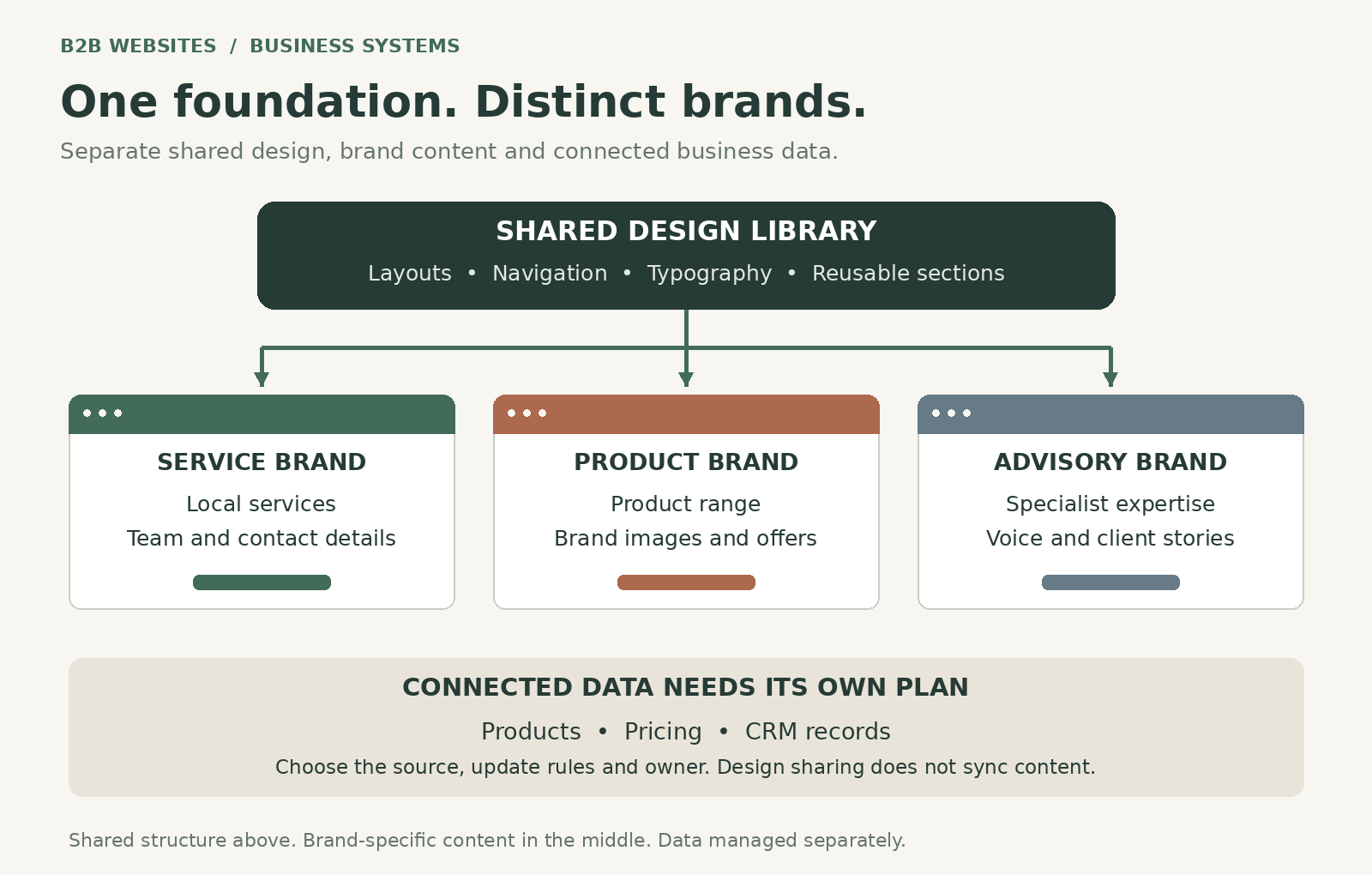
Think of a shared foundation as an agreed collection of reusable parts. It might contain navigation patterns, enquiry sections, cards for services, spacing rules, heading styles and approved page layouts.
A component is simply a reusable section with a defined structure. Your team can use that section in several places without designing every detail again. A design system adds the rules for using those parts consistently, including how brand variations should work.
Reusing a component is different from copying a page. A copy can become an independent version that drifts over time. A managed shared component has an identifiable source and an update process. The exact behaviour depends on the platform and how the websites are built.
The planning starts before development. Our article on streamlining the workflow from Figma to Webflow discusses the design handover. For a group of websites, that handover should also define which elements are shared, which can vary and who approves changes.
Why this is timely for Webflow users
On 7 October 2026, Webflow announced support for sharing global tag styles through Shared Libraries. These are default styles for elements such as headings, paragraphs and the page body. Including them in a library can help shared components appear consistently across sites.
Webflow says the feature is available on paid Workspace plans. Local site tag styles take precedence over library tag styles, and classes take precedence over both. That makes existing styling important when assessing how an update will behave.
This is a useful improvement for design consistency. It does not, by itself, synchronise your product information, publish every site or eliminate site-specific checking. A shared design library and a shared content system solve different problems.
For business owners, the useful question is practical: could the repeat work on our websites be reduced with a better shared foundation? A platform announcement is a reason to review the setup, not a reason to rebuild automatically.
Decide what to share and what to keep local
Good candidates for reuse include common page structures, accessible navigation patterns, standard enquiry layouts and presentation rules. These are the parts where consistency can make maintenance easier without weakening a brand.
Brand identity needs more judgement. Sister brands may share a layout while using different colours, imagery and tone. Unrelated brands may need separate design libraries, with only selected technical patterns reused.
Local information should have a clear owner. Telephone numbers, service areas, team profiles, opening hours and customer examples often differ between sites. A shared contact section must still show the right information for the right business.
Pricing, claims and offers also need explicit decisions. Never assume that something approved for one brand is approved for the whole group. The same applies to enquiry routing: a familiar-looking form should still reach the correct team. A useful inventory records each repeated element, its source, the sites using it and the permitted exceptions. This turns a vague ambition to “make everything consistent” into a defined maintenance task.
Shared design does not mean shared business data
A product card can look identical on three websites while showing three different prices. That is not necessarily a mistake. The brands might serve different customers or offer different packages.
If the same product information should appear everywhere, decide where the authoritative record lives. That could be a product system, CRM, database or a deliberately managed content platform. Then define how each site receives updates and what happens if an update fails.
Our explanation of integrated software solutions for websites covers this broader relationship between the website and business operations. A library for buttons and layouts is not a substitute for that integration work.
The distinction matters when comparing proposals. Ask the provider to separate shared design, shared content and connected workflows. Otherwise, “update once” can sound much broader than the delivered system actually supports.
Check whether separate websites are still the right choice
Before investing in a multi-site system, review why the separate sites exist. Distinct brands, audiences and customer journeys may justify them. A collection of nearly identical location sites may deserve a different approach.
Sometimes one stronger website with well-organised location or service pages is easier to maintain. In other cases, separate sites are important to how customers recognise and choose each business. The decision should reflect those needs, alongside the maintenance implications.
Do not consolidate purely to simplify the developer’s workload. Existing URLs, useful content, enquiry paths and reporting need a migration plan if the structure changes. Equally, do not keep adding websites just because duplicating the last one seems quick.
Ask what customers need to understand and do. The principles in Elements of a High Converting Website remain relevant: a cheaper system is only useful if people can still find the right information and take the next step.
Put a business case around the change
Start with actual maintenance records. Review three to six months of requests and separate genuinely repeated tasks from changes unique to one site. Include briefing, development, approvals, testing and corrections.
For illustration only, suppose a recurring update takes two hours on each of four independent sites. That is eight hours. A shared approach might take three hours to prepare the common change plus half an hour to check each site, totalling five hours. The difference is three hours per update—not a guaranteed saving for your business.
At ten comparable updates a year, that hypothetical saving becomes thirty hours. Compare its value with the setup work, additional platform costs, ongoing library maintenance and staff training. If the shared approach requires forty hours to establish, it would not recover that setup time in the first year on these assumptions alone.
Also distinguish capacity from cash. Saving an employee time can free them for other work without reducing payroll. Reducing billable agency hours may affect spend more directly, depending on the contract.
Include hosting and support in the comparison. Our guide to why hosting matters in custom web design provides useful context. Reusing design does not make separate domains, site plans, integrations or support obligations disappear.
Use controlled updates across the group
A shared element can spread an improvement widely. It can also spread a mistake. The release process therefore matters as much as the component itself.
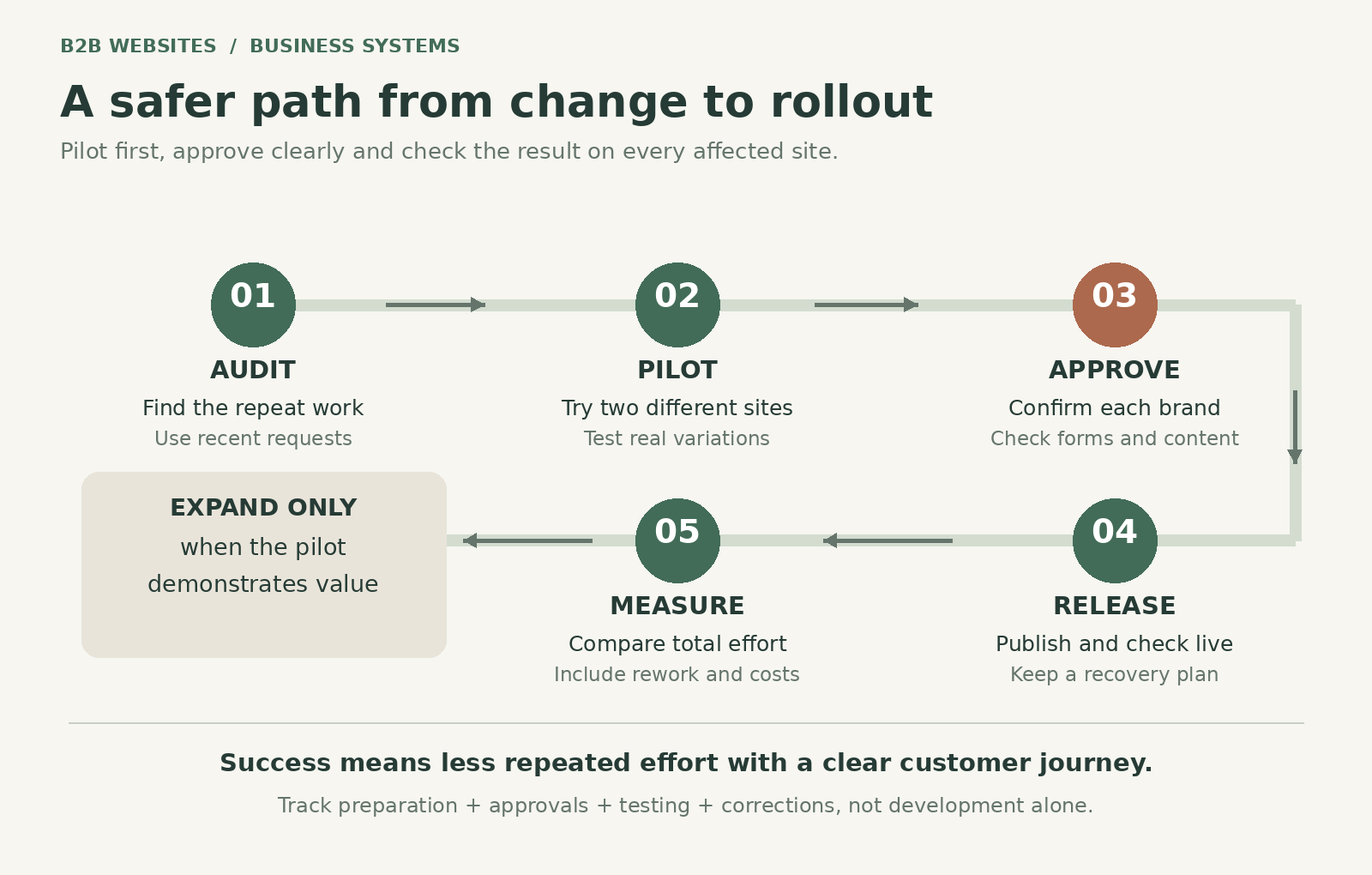
Nominate an owner for the shared library and an approver for each brand. Decide which changes are routine and which need business sign-off. Record the sites affected, the intended result and how to recover if something behaves unexpectedly.
Test the change on a representative site before rolling it out more widely. Check mobile layouts, long headings, keyboard access, links and real form submissions. Confirm that enquiry records arrive in the correct system and reach the correct team.
A staging preview cannot answer every question about the live website. Check the published result too, particularly where domains, forms or external integrations behave differently. Schedule releases when someone can respond to problems.
The responsibility for reviewing content should be explicit. Our article on asset collection and client proofreading before launch explains why business review remains important. A developer can check that a telephone link works; the brand owner must confirm that it is the correct number.
Start with one repeated problem
You do not need to standardise every website at once. Choose a recurring problem with a clear owner and a manageable scope, such as inconsistent service cards or a frequently reused enquiry section.
Pilot the change across two representative sites. Include one that has meaningful differences, so the exercise tests variation rather than demonstrating the easiest possible case. Record preparation time, testing time, approval delays and any rework.
Compare the complete process with the previous method. Did the update take less effort? Were fewer corrections needed? Can the team explain how the next update will work? Did the customer journey remain clear?
Document exceptions instead of quietly building around them. A growing list of exceptions may mean the shared component is too broad, or that the sites should use different foundations. Expand only when the pilot provides a useful answer.
Frequently asked questions
Will all our websites have to look the same?
No. Shared structures can support different brand colours, images and content. The permitted variations need to be designed and documented. If the brands have fundamentally different needs, separate libraries or selective reuse may be more sensible than one universal system.
Can we improve existing sites without rebuilding them?
Potentially. Start by reviewing their platforms, structures and styles. Some reusable elements can be introduced gradually; other sites may require substantial preparation. Ask for a scoped pilot and a clear explanation of what can be retained before approving a rebuild.
Does a shared library update every website automatically?
Do not assume so. Confirm how library updates are shared, reviewed, applied and published in your chosen setup. Content, integrations and local overrides may need separate attention. Ask your provider to demonstrate the complete process using two of your sites.
How many websites make this worthwhile?
There is no universal threshold. Two frequently updated, closely related sites may offer more opportunity than ten unrelated sites that rarely change. The useful measures are repeated effort, variation, setup cost and the ongoing responsibility for maintaining the shared system.
Make the next website easier to maintain
Your next website should benefit from the work already invested in the business. That starts with understanding where reuse will help and where each brand needs independence.
B2B Websites can review your websites, repeated maintenance tasks and connected systems, then help identify a practical starting point. Bring your site list and a few recent change requests so the discussion centres on real work.
Talk to B2B Websites about a multi-site website review. We can help you assess shared components, brand variations and ongoing maintenance before you commit to a wider rollout.










%2520-%2520Main%2520Image.jpeg)
Versatility Across All Platforms


How can i help you today?


