

Your Next Employee Might Be an AI Agent?
But What Work Should You Actually Give It?
An AI agent can help organise enquiries, prepare follow-ups and bring overdue work to your attention. The best starting point is one defined task, reliable business information and a person responsible for checking the result.
For many Australian business owners, AI has become a useful writing assistant. Ask for an email, an explanation or a report, and it produces something you can use. Someone then opens the CRM, checks the customer history and completes the work.
Agents can take that further. With suitable connections and permission, they can use business tools to work towards an objective. That creates opportunities to reduce administration, but it also makes the instructions you give them more important.
On 8 October 2026, Google announced its Gemini agent, describing work across connected applications alongside permissions and auditing controls. Its announcement illustrates the direction of development; it does not mean every business system is ready to connect or every feature is available on your existing subscription.
The useful question for an SME is practical: what work would you give an agent, and how would you know it had done a good job?
Give your agent a job description
Think about how you would introduce a new administrative assistant to your business. You would explain the work, show them the systems and identify decisions that need approval. An agent needs that same clarity, although it does not bring an experienced employee’s judgement or accountability.
Give it four foundations: current business knowledge, clear instructions, appropriate access and supervision. “Improve our sales” is too broad. “Each morning, identify open quotations with no reply after seven days and prepare follow-up drafts for the salesperson” is a job you can assess.
Specify where the agent should look, what counts as a completed task and when it should stop. Name the person responsible for exceptions. Our earlier article, AI Agents for Business: Is Your Website Ready to Work Harder?, introduces the wider connection between agents and your website. Here, the focus is choosing the work.
Seven practical jobs for an AI agent
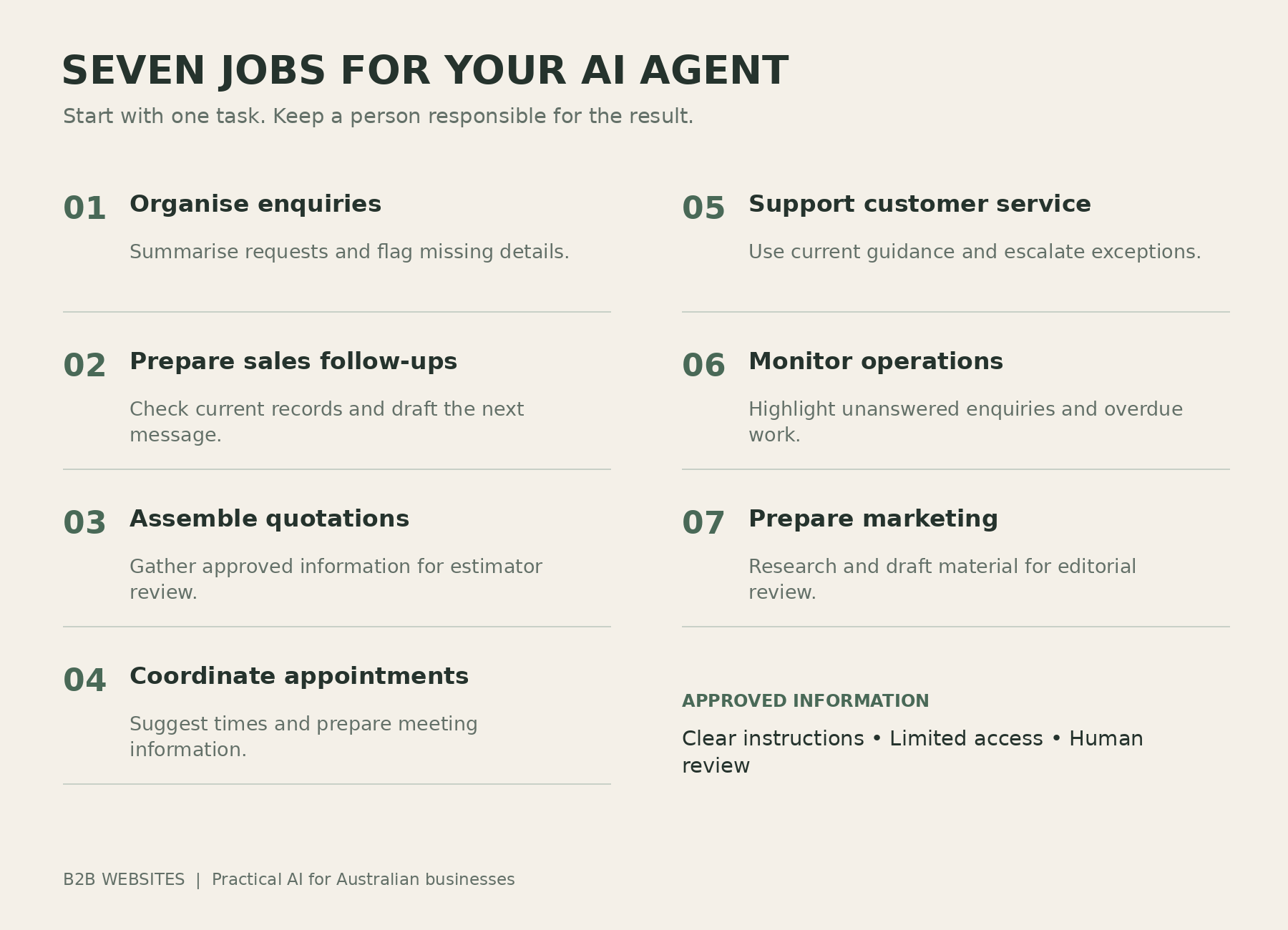
1. Organise customer enquiries
A website enquiry often creates several small tasks: read the message, identify the service, check for an existing customer and assign someone to respond. An appropriately configured agent could prepare that information and highlight anything missing.
For example, a commercial cleaning enquiry might specify the suburb and building type but omit the frequency required. The agent could prepare a clarification for review and place the opportunity in the right pipeline. It should use approved service areas and avoid promising availability it cannot verify.
2. Prepare sales follow-ups
An agent could review open opportunities, check recent correspondence and prepare messages for quotations awaiting a response. Your salesperson then reviews the draft with the relevant history alongside it.
The important work happens before writing: confirming the quotation is still open, checking for replies and respecting any instruction about contact. A customer who has already accepted should not receive a “just following up” email. Start with drafts and expand sending permissions only after testing the process.
3. Assemble quotation and proposal drafts
Quotes often draw on enquiry notes, specifications, price schedules and previous discussions. An agent can gather approved information and populate a template, leaving the estimator to assess scope and final pricing.
An electrical contractor, for instance, could receive a draft with the customer’s requested work and unanswered questions clearly separated. Materials, access requirements and labour still need qualified review. If customers need an initial estimate before speaking with you, our article on online quote calculators explores that earlier step.
4. Coordinate appointments and preparation
With authorised calendar access, an agent could suggest available times, prepare confirmations and assemble background notes. After a meeting, it could turn approved notes into draft actions for the CRM or project system.
Explain your real scheduling rules: working hours, meeting duration, travel allowance and who can attend. Decide whether it may create bookings or only propose them. The benefit should be fewer scheduling exchanges and better preparation, with existing commitments respected.
5. Prepare routine support responses
An agent using current support information could answer common questions about booking changes, operating instructions or where to find documents. It should recognise when the available information does not answer the question and pass it to a person.
Separate routine help from decisions such as refunds or disputed charges. Sometimes customers simply need better access to their own information. Our article on customer portals and reducing service calls explains another way to address that workload.
6. Summarise operational exceptions
Owners frequently spend time finding unanswered enquiries, overdue tasks and projects waiting for customer information. An agent could review authorised records and produce a short list of items needing attention, linking each item to its source.
Require it to distinguish a confirmed problem from a possible one. An old project note does not necessarily mean a job remains blocked. A useful report tells the manager what needs checking and why, rather than presenting uncertain conclusions as facts.
7. Support marketing preparation
An agent could suggest topics from customer questions, gather research, prepare drafts and identify website information that needs review. Give it your audience, tone, offers and approved evidence so the work reflects your business.
Keep a named editor responsible for publication and factual claims. The agent must not invent testimonials, project outcomes or product capabilities. Our article on AI-generated website content explains why first-hand knowledge and
verification matter to the finished material.
Connected systems make useful delegation possible
Before introducing an agent, examine where information lives. If staff must reconcile a spreadsheet, several inboxes and private messages to understand a job, an agent will face the same uncertainty.
At B2B Websites, our work for Thompsons Bus Services involved an administration platform and mobile-friendly Progressive Web App, built with Webflow, Wized and Xano. Capabilities included sign-on and sign-off, break recording, shift tracking, availability and operational communications.
This project demonstrates connected operational information; it is not being presented as an AI-agent implementation. The distinction matters. A reliable record of events provides a stronger starting point for future reporting or assistance than scattered information that must be reconstructed.
You may need to improve your data flow before adding AI. Our explanation of integrated software solutions covers how websites can connect with internal business systems.
Choose between ordinary automation and an agent
Some work follows a fixed rule and can be handled by a straightforward integration. AI becomes more useful when the input varies and interpretation is required. The right solution may combine both approaches.
Task
Sensible starting point
Copy form fields into the CRM
Ordinary automation with validation
Interpret an enquiry and identify missing details
AI assistance with defined categories and review
Send a standard appointment confirmation
Ordinary automation after a confirmed booking
Investigate a stalled enquiry across several records
An agent with authorised access and source references
A person remains responsible for decisions requiring experience or authority. Ask your developer to explain why each step needs AI and what happens if a connection fails. A simpler workflow may deliver the result with less ongoing maintenance.
Set boundaries before connecting customer information
For a first project, allow the agent to read relevant records, prepare drafts and flag exceptions. Keep refunds, discounts, contract changes and unsupported service commitments outside its authority unless a specific process has been approved and tested.
Give it access to the information needed for the job. Record its actions and make it easy to pause the workflow. Instructions contained in customer emails or uploaded files should be treated as content to assess, not authority to change the agent’s permissions or disclose information.
Decide who will investigate errors and how affected records can be corrected. Ask your provider how customer information is handled and retained. These are practical implementation questions to resolve before using live records, alongside your business’s applicable requirements.
Measure the capacity recovered
Consider an illustrative business receiving 150 enquiries each month. If reviewing and entering each enquiry takes ten minutes, that is 25 hours of administration. If a tested workflow reduces processing and human review to four minutes per enquiry, the workload becomes ten hours.
That would recover 15 hours per month. At an assumed fully loaded labour cost of AU$45 per hour, the equivalent capacity is AU$675 monthly, before software, implementation, support and error-handling costs.
This is a worked example, not a client result or a promise of savings. Recovered capacity becomes valuable when staff use it productively; it does not automatically reduce wages. Record the original task time, the time after implementation including review, error rates, ongoing costs and the effect on customers.
If the review effort exceeds the time saved, improve the process or reconsider the task. A useful trial should make that visible.
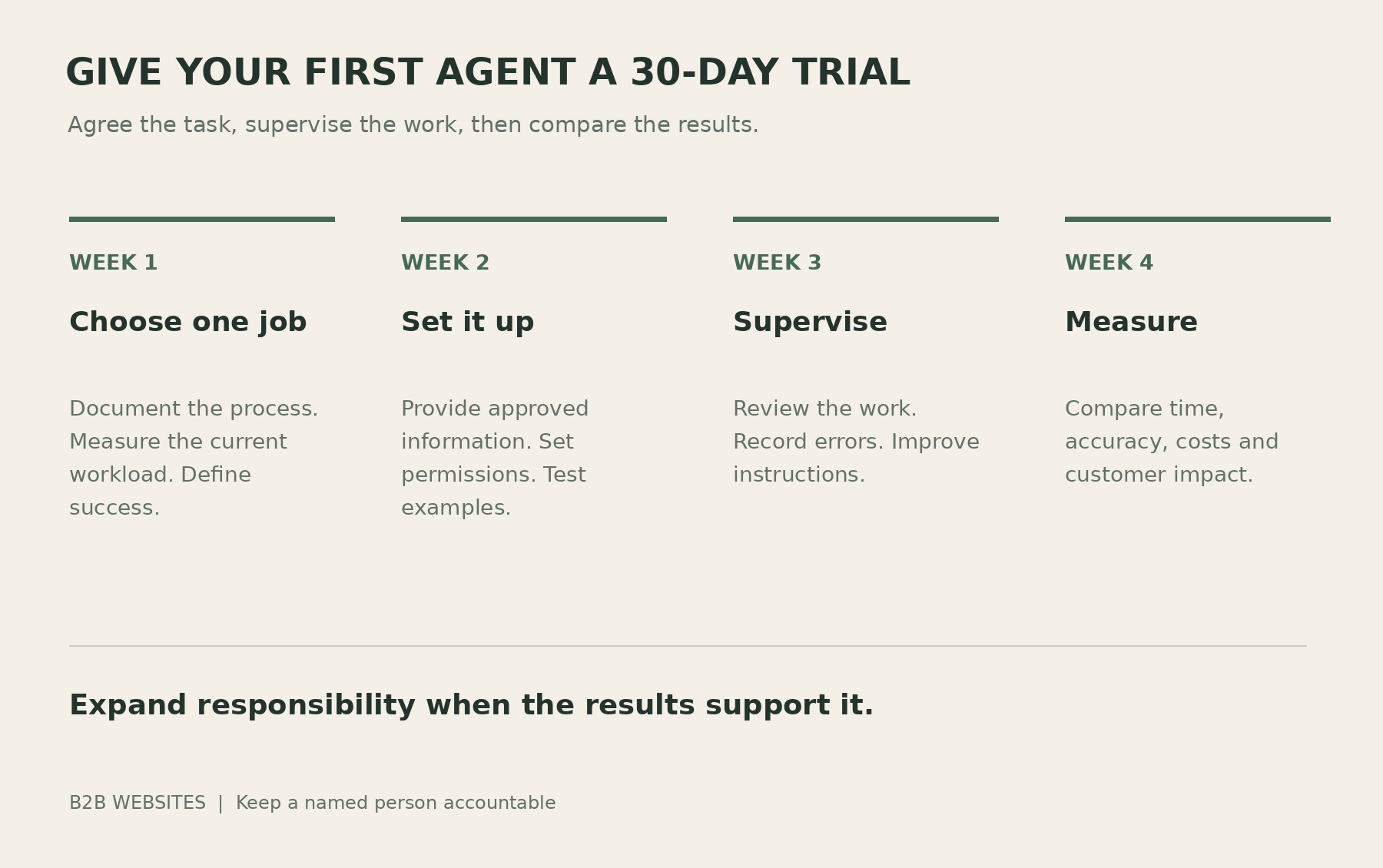
Give your first agent a 30-day trial
Week 1 — Choose one job. Document the current process, measure its workload and agree what success looks like. Include ordinary examples and exceptions so testing reflects real work.
Week 2 — Provide information and instructions. Connect approved sources, set permissions and define when the agent must ask for help. Test drafts before allowing changes to live records.
Week 3 — Supervise the work. Run a limited trial, inspect the results and record corrections. Fix unclear instructions or unreliable source information rather than repeatedly repairing the same output.
Week 4 — Compare results. Review time, accuracy, costs and customer impact against the original process. Decide whether to continue, revise or expand. Assign an owner for ongoing monitoring after the trial ends.
Where your website fits
For many businesses, a website enquiry starts the workflow. The website needs to capture useful details and pass them accurately to the CRM. An agent can then help interpret the request and prepare an appropriate next step.
This connects with B2B Websites’ AI Visibility Ladder: AI-Readable, AI-Trusted, AI-Recommended, and Automation & AI Integration. The first stages address how clearly your business can be understood and assessed; recommendations remain an objective, not a guarantee. Stage four concerns connecting that digital presence with everyday operations.
You do not necessarily need a new website. Assess the existing forms, integrations and data quality first. The investment should follow the business task you want to improve.
Frequently asked questions
What is an AI agent for business?
It is software that uses AI and connected tools to work towards an assigned objective. Its ability to read information, prepare work or take action depends on its configuration and permissions.
How is an agent different from a writing assistant?
A writing assistant produces material for you to use. An agent can also use authorised tools to complete parts of a workflow. Some products offer both capabilities, so assess the actual setup.
Can an agent work with our existing CRM?
Possibly. Check the available integrations, API access, subscription requirements and permissions before committing. A familiar product name alone does not establish compatibility.
What is a sensible first task?
Choose repeated work with reliable information and a measurable result. Preparing enquiry summaries or follow-up drafts can be suitable when a person can check them easily.
Can an AI agent make mistakes?
Yes. It can misunderstand a request, use outdated information or choose an inappropriate action. Testing, restricted access, review and monitoring help manage those problems.
Will an agent replace our administrative employee?
It may assist or automate particular tasks. Employees still manage relationships, exceptions and decisions. Assess the effect on the actual workload before making staffing assumptions.
How much will implementation cost?
Costs depend on the task, connections, software usage, testing and support. Request an estimate covering setup and ongoing operation, then compare it with the value demonstrated during the trial.
Does using an agent require a new website?
No. An existing website may already support the required connections. Review the process and technical options before deciding whether changes or a rebuild are justified.
Give your agent work you can evaluate
An agent earns its place by completing useful work reliably. Choose a task, provide accurate information and keep someone responsible for the outcome. Expand its role when the evidence supports it.
At B2B Websites, we help Australian businesses develop AI-ready websites and connect their business software. If you are considering agents, we can help identify where better information, ordinary automation or AI assistance could improve the process.
Book an AI visibility review to discuss your website, connected systems and a practical starting point.












%2520-%2520Main%2520Image.jpeg)
Versatility Across All Platforms


How can i help you today?


