

Could Your Website Be Publishing Customer Information You Never Intended Google to Find?
Your website should help people discover your services.
It should also keep customer information within the audience you intended. As websites add quote tools, uploads and customer dashboards, those two responsibilities need deliberate attention.
Imagine a customer opening a link to approve printing artwork. The page includes their name, a delivery address and the agreed price. It works perfectly, so everyone assumes the job is finished.
But can someone open that same page without signing in? Does the artwork file have its own public address? Could the link appear in search results?
These are questions worth asking before the next customer document goes online. A page does not become private because nobody added it to the menu.
Why this deserves attention now
On 26 October 2026, Google updated its guidance on preventing user-generated spam. The update specifically addresses keeping link-shared content that is not intended for search out of the index and monitoring abuse through Search Console. Google’s update log records the change.
The guidance concerns platforms where people can create pages and other outputs. It also prompts a useful question for Australian SMEs: which parts of our website are actually meant to be public?
An online estimate, shared report or uploaded attachment can create another addressable resource. Business owners may think about the customer experience while overlooking how that resource is delivered.
This article provides a practical review process. It does not suggest that Google’s update created a new vulnerability or that every shared page contains confidential information.
Three decisions your website needs to separate
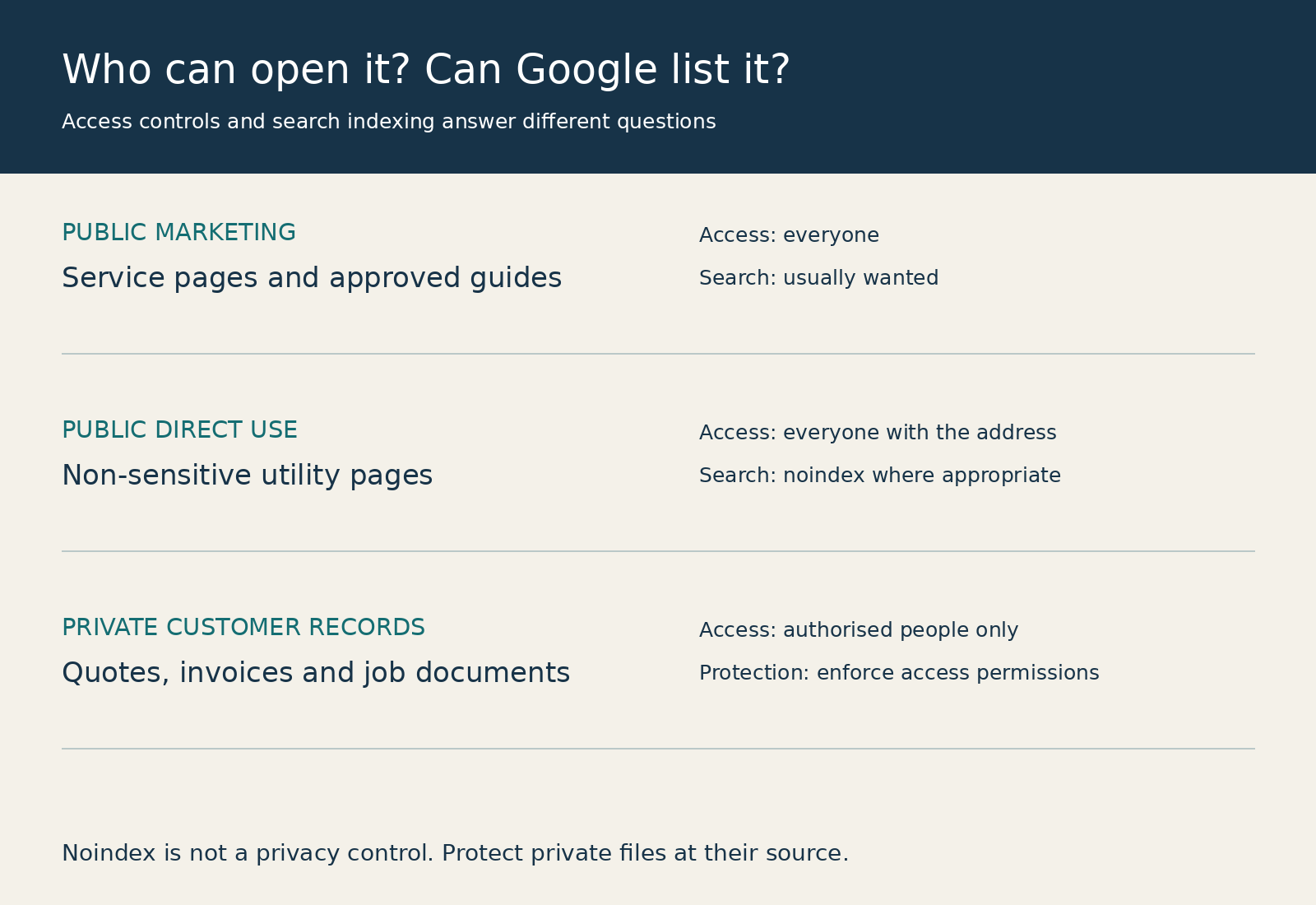
Start by distinguishing access, indexing and presentation in search results.
Access determines who can retrieve the information. Private material needs controls that check the visitor’s identity and entitlement to the particular record or file.
Indexing determines whether a supporting search engine includes a resource in its searchable collection. A page can be publicly accessible while carrying an instruction that asks Google not to index it.
Search presentation determines what may be displayed from eligible content. Restricting a snippet does not stop someone opening the underlying public page.
These controls answer different questions. A useful business policy identifies both the intended audience and the intended discoverability of each type of content.
Our guide to making your business website AI-readable focuses on helping systems understand public business information. Customer records require a separate access decision.
Where unintended exposure can happen
The following are illustrative situations to investigate, rather than findings about any particular client website.
Customer quotations and generated estimates
A calculator may produce a personalised results page containing contact details and project requirements. A generic public price guide and an individual customer quotation should not automatically inherit the same publishing settings.
Ask whether results need to remain available, who should reopen them and how long that access should last. Avoid placing personal details in page addresses.
Our article on online quote calculators explains their commercial value. Designing the delivery of individual results belongs in the same planning discussion.
Uploaded PDFs and images
A private-looking page can link to a publicly accessible PDF. Artwork, inspection reports, invoices and photographs may be served from a separate file host with different permissions.
The page and every attachment need appropriate controls. A filename containing a customer’s surname is also worth reviewing, especially when the address itself is visible elsewhere.
Customer dashboards and approval screens
A dashboard may display only the signed-in customer’s jobs, yet the underlying document address might work for anyone who has it. Checking the screen alone misses that distinction.
A well-designed customer portal checks permission for the requested information, including direct file and background data requests.
Preview pages and old website copies
A development site might contain copied customer information, test submissions or internal notes. An old subdomain can remain online after the new website launches.
Include previews, staging environments and legacy file locations in the review. Using invented data during development reduces the consequences of a publishing mistake.
Shared reports and AI-generated outputs
A tool might turn a form submission or conversation into a shareable report. The report’s accessibility depends on the application’s configuration, not on whether a person or AI wrote it.
As discussed in our guide to AI agents for business, connected tools need defined permissions. Check whether sharing is enabled by default, whether recipients must sign in and whether access can be withdrawn. A link intended for one customer should not silently become a public marketing asset.
Hidden from navigation does not mean private
Removing a page from the menu only changes how visitors navigate. Someone may still reach it through a forwarded message, another page, a browser history entry or a direct address.
A long, difficult-to-guess link can reduce casual discovery, but anyone possessing an unrestricted link may be able to use it. For sensitive customer records, assess whether authenticated, authorised access is required.
If the business deliberately uses a link as an access credential, its scope, expiry and handling need careful design. Describe the arrangement accurately to customers rather than calling it private simply because the address is obscure.
The same applies to a lock icon or reassuring text on the page. What matters is what an unauthorised request can actually retrieve.
What noindex and robots.txt can do
Google’s noindex documentation explains how a page tag or HTTP response header can instruct Google to exclude content from search results.
This can suit a non-sensitive public utility page that people should reach directly rather than through search. It does not authenticate visitors or prevent downloads.
For Google to process a noindex instruction, it must be able to crawl the resource and see it. Blocking that resource in robots.txt can prevent the instruction being read. Your developer should choose a consistent approach for the intended outcome.
Google’s robots.txt guidance also explains that crawl restrictions are not a way to secure private information. A disallowed address can still appear in search results in some circumstances.
For confidential material, prioritise access restrictions. Do not make a sensitive page publicly accessible merely so Google can read a noindex tag.
Files need attention too. Where a non-sensitive PDF should remain public but stay out of Google, a developer can assess an appropriate HTTP indexing header. Where the PDF is confidential, the download itself needs protection.
A practical website review for business owners
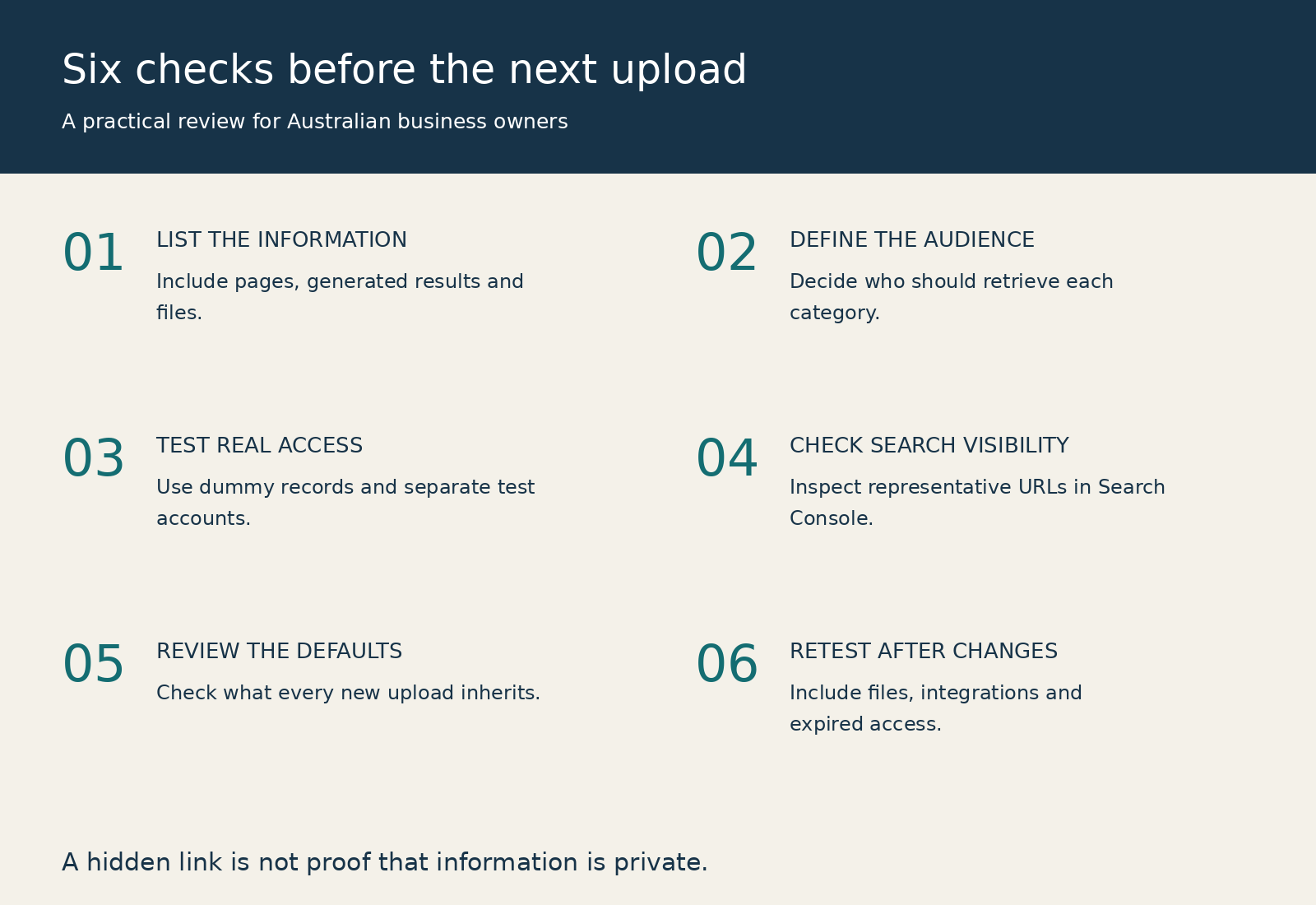
1. List the information your website handles
Go beyond marketing pages. Include enquiries, quotation results, uploads, invoices, job reports, approval records, customer messages and generated summaries.
Identify the system that stores each item and the person responsible for it. This often reveals that a website, CRM and file service each control a different part of the journey.
Our explanation of integrated software solutions covers how these connections turn websites into business systems. Their information boundaries deserve the same planning as their workflow benefits.
2. Decide who should see each category
Give every category an intended audience: everyone, a particular customer, approved staff or specified partners. Then record whether public search discovery is wanted.
A published case study may suit search after approval and appropriate editing. The original customer brief may belong only to the delivery team. Do not assume both should be public because they concern the same project.
3. Test with sample accounts and invented records
Ask your developer to demonstrate what happens when someone opens a sample link while signed out, signs in as another test customer or uses an expired link.
Test the attachment separately from the page containing it. Include background data requests and permission changes after an employee leaves.
Use authorised testing with dummy records. There is no need to expose real customer details while demonstrating the access rules.
4. Review what Google can currently find
Check Search Console for relevant indexed addresses and inspect representative URLs. A search such as site:yourdomain.com filetype:pdf can help identify publicly discoverable documents, but it is not a complete inventory or proof of privacy.
Review sitemaps and public links as well. Removing an address from a sitemap does not revoke access or guarantee removal from search.
Extend the review to file hosts and subdomains where appropriate. A clean result for the main website says little about another service delivering the attachment.
5. Check what happens when content is created
A one-off cleanup will not help much if every new report inherits public settings. Agree the default for new uploads, generated pages and customer records.
Define who may publish material for general discovery and what approval is needed. Customer-facing teams should understand the difference between sharing a record and publishing an article.
6. Repeat the checks after changes
A new form, storage integration or portal feature can change how information is delivered. Include access and discoverability checks in release acceptance, alongside usability and mobile testing.
Keep a record of the sample cases tested and the expected result. This gives the business a practical reference when another developer or supplier takes over.
If customer information is already public
First restrict or remove the exposed material at its source and investigate the scope. Preserve appropriate evidence securely so the responsible team can understand what happened.
Google’s Search Console Removals tool can temporarily suppress results from a site you control. It complements the source correction; it does not remove material from the internet or other search engines.
Check alternate file addresses, copied records and access links. Confirm that the original issue cannot reproduce itself when another customer submits the same form.
If personal information was involved, involve the person responsible for privacy and obtain advice on any applicable response or notification requirements. Those depend on the circumstances and the business; a search cleanup alone does not settle them.
Keep your public website useful
A blanket decision to hide everything can make services harder to discover without fixing the handling of customer records.
Protect the operational information while maintaining accurate public service pages, useful guides and approved examples. In The Great Website Bypass, we discuss changes in how customers discover businesses. That makes intentional publishing more valuable, while customer-specific information still needs its own controls.
The business objective is straightforward: help prospective customers understand your capabilities and give existing customers appropriate access to their own information.
Frequently asked questions
Can Google find a page that is not in my website menu?
Yes. A menu is only one route to discovery. Removing a navigation link does not restrict access to the page or ensure it stays out of search.
Does noindex make a customer document private?
No. It is an indexing instruction for supporting search engines. Anyone able to retrieve an otherwise public document may still read or share it.
Is robots.txt suitable for protecting confidential records?
No. Use access controls suited to the information. Robots.txt manages compliant crawler behaviour and does not enforce customer permissions.
Can a file be public even when the portal requires a login?
Yes, if file delivery has been configured separately without equivalent protection. Ask for a demonstration using the direct address of a dummy attachment.
Will removing a Google result remove the information everywhere?
No. Google’s removal tools affect Google Search. Correct the source and consider other copies, hosts and search services separately.
Do we need a new website to fix this?
Not necessarily. The issue may involve storage permissions, a publishing default or one application workflow. Review the current implementation before deciding on a rebuild.
Should every customer page be indexed for AI visibility?
No. Public business information and customer records serve different audiences. Discoverability is not a reason to publish information intended for restricted access.
How often should we review the settings?
Include checks when introducing forms, portals, uploads or integrations, and agree periodic reviews with the person maintaining the system. The frequency should reflect the information and how often the service changes.
Know what your website is making available
A website can provide an excellent customer experience while still delivering information to a wider audience than intended. The useful next step is to check actual access, rather than relying on how private the interface looks.
At B2B Websites, we build websites, portals and connected business systems. We can help review how your website collects, shares and presents information, then scope practical improvements around the systems you already use.
Unsure which parts of your website are public? Contact B2B Websites to discuss a website and customer portal review.












Versatility Across All Platforms


How can i help you today?


